
On this page
What is Cross App Access?
Cross App Access (XAA) provides a low-friction mechanism for an app to establish secure connections with a third-party resource server. The third-party resource server resides in a separate domain that's protected by an external authorization server.
To support cross-domain authorization, a trust relationship is established between the app's identity provider and the external resource authorization server. Using XAA, a user can sign in to their app and the app can then access data across domains within a resource server on the user's behalf. The app securely accesses the resource server without extra consent prompts.
The problem XAA solves
Traditional external resource authorization methods (such as API authorization) create security and operational challenges in enterprise environments:
- Limitations of static API keys and standard OAuth: Static API keys lack end-user context, and grant overly broad permissions. Direct app-to-app OAuth flows operate outside central identity governance.
- Benefits for enterprise customers: XAA provides centralized governance, unified policy enforcement, and audit logging for every XAA request.
- Benefits for end users: Users sign in once through their primary IdP and seamlessly access connected tools without repeated authentication prompts.
- Benefits for ISV developers: Independent software vendors (ISVs) can meet enterprise security requirements faster, reducing friction in sales cycles. They can build their XAA-enabled integration once and reuse it for their customers.
How Cross App Access works
XAA supports authorization chaining across domains by implementing the Identity Assertion JWT Authorization Grant (ID-JAG) flow, an extension of the OAuth 2.0 framework. See Identity Assertion JWT Authorization Grant (opens new window) and OAuth Identity and Authorization Chaining Across Domains (opens new window).
XAA roles
Roles and responsibilities in the XAA flow:
- Requesting app (client): The client app that accesses a protected resource on behalf of the authenticated user. This is the app that initiates the API calls to the external resource server.
- Resource app (protected API server): The app that contains the protected resource data. This is typically an API resource server.
- IdP: The identity provider that has an SSO relationship to the requesting and resource apps. It issues the ID-JAG based on this relationship connection. With Okta as the IdP, the admin manages this connection in Okta. The Okta authorization server issues the ID-JAG only for scoped access allowed in that connection. With an external IdP, the IdP manages the connection and issues the ID-JAG accordingly.
- Resource authorization server: The authorization server that's protecting the resource app. It validates incoming ID-JAG tokens and issues scoped access tokens in accordance with local access control policies.
External IdP in the IdP role
An external OpenID Connect (OIDC) IdP, or another Okta org acting as an Okta integration IdP, can also fill the IdP role and issue the ID-JAG. See Configure XAA with an external IdP.
In that scenario, Okta acts only as the resource authorization server. Okta trusts the ID-JAG from the external IdP. Okta retrieves the signing key from the JWKS endpoint that's configured for the IdP and uses it to verify the ID-JAG signature. Okta then matches the user in the ID-JAG to an Okta user through a linked IdP identity, so the user doesn't sign in to Okta. For org-to-org (Org2Org) scenarios, the issuing Okta org configures an Org2Org app as an XAA resource app that targets your custom authorization server. This scenario applies only to a custom authorization server. The Okta org authorization server doesn't accept an ID-JAG issued by an external IdP.
XAA token exchange flow
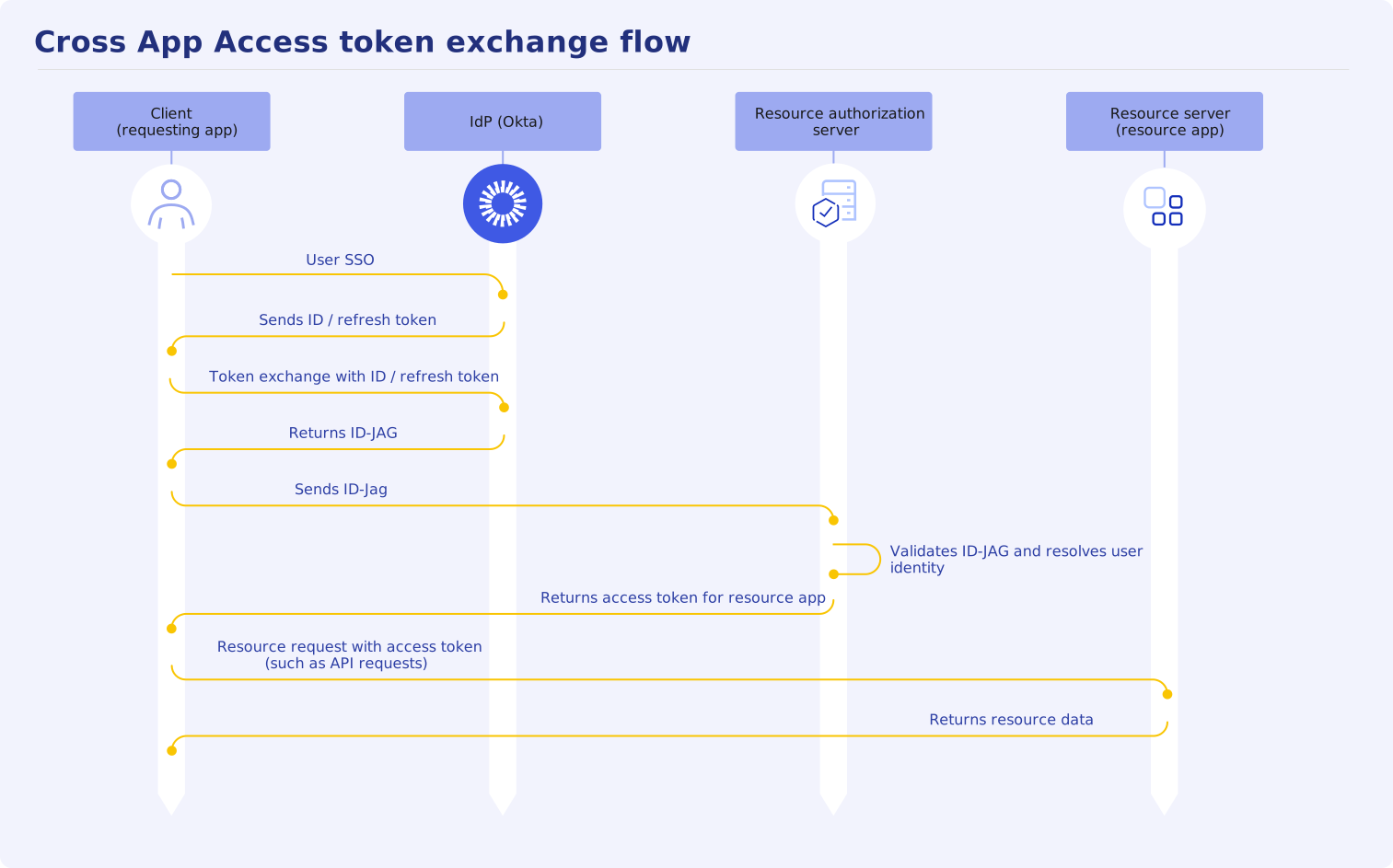
- User SSO: The user signs in to the client (requesting app) through the IdP using standard SSO.
- ID/refresh token issued: The IdP returns an ID or refresh token.
- Token exchange for ID-JAG: The client exchanges its user ID assertion at the IdP authorization server to obtain an Identity Assertion JWT Authorization Grant (ID-JAG) token. The user ID assertion can be an ID or refresh token.
- ID-JAG token issued: The IdP authorization server issues an ID-JAG token to the client if the client has a trusted connection to the resource server.
- JWT Authorization Grant: The client presents the ID-JAG token to the resource authorization server.
- Validates ID-JAG and resolves user identity: The resource authorization server validates the ID-JAG and resolves the user identity. See Validate ID-JAG tokens on your resource server.
- Resource access token issued: After the ID-JAG is validated, the authorization server issues a short-lived, scoped access token.
- Client accesses resource data: The requesting client uses the short-lived, scoped token to access the protected resource app on the user's behalf.
- Returned resource data: The resource app returns requested data that's scoped to the access token.
See Implement XAA token exchange for your requesting app for the AI agent-to-app token exchange implementation in Okta.
Use cases
XAA addresses critical security, compliance, and user-experience challenges across modern enterprise SaaS environments. By shifting authorization decisions from end users to enterprise IT administrators, XAA replaces static API keys and interactive consent prompts with a central identity policy.
AI agent-to-app
AI agents that act on behalf of users require access to third-party SaaS apps and internal databases. Authorization methods that force users to complete individual OAuth consent pages or embed static API keys fail to scale for enterprises and introduce security vulnerabilities.
XAA integrates directly with AI agent frameworks and server standards, such as the Model Context Protocol (MCP). It enables AI assistants to perform complex, multi-app actions while preserving the signing user's identity context.
Common AI agent scenarios include:
- Cross-tool project aggregation: An AI assistant (such as Claude or Cursor) compiles a project status report by retrieving milestones from project management platforms (such as Asana or Linear), pulling technical specs from a documentation platform (such as Atlassian Confluence), inspecting designs from a design tool (such as Figma), and analyzing meeting notes from note-generating platforms (such as Zoom or Granola).
- Automated developer operations: Developer tools and code editors (such as Visual Studio Code or Cursor) query container registries (such as Docker). They also inspect app performance metric tools (such as Datadog), or query production databases (such as Supabase) using the engineer's scoped user identity.
- Enterprise AI search: Federated AI search tools (such as Glean) retrieve internal company records from connected cloud services only when the end user has active permissions. This prevents data leaks across organizational boundaries.
Note: See Configure AI agent-to-app with XAA for Okta Admin Console instructions on how to configure an AI agent-to-app connection with XAA.
App-to-app
Business apps need to share data and trigger workflows across identity service boundaries. Traditional app-to-app integrations rely either on user-managed OAuth authorization flows (which interrupt employees with consent pages) or static API keys and shared service accounts (which lack user context and bypass enterprise IT policy).
XAA extends enterprise identity governance to direct app-to-app data exchange. When a user interacts with a requesting SaaS app, XAA allows that app to securely access APIs in a separate target app on the user's behalf (without prompting the user and without using shared secrets).
Common app-to-app integration scenarios include:
- Messaging and productivity synchronization: A team collaboration app (such as Zoom) accesses an enterprise notification API (such as Slack) on another server, sending action items and notifications to employees.
- Project management and issue tracking: A project planning platform (such as Asana or Linear) pulls live issue statuses, customer details, or pull request updates from developer and CRM tools (such as Jira, Salesforce, or GitHub) under the context of the active team member.
- Automated workflow execution: An enterprise integration platform (such as Zapier or Workato) triggers multi-step actions across connected HR, payroll, and IT ticketing tools while preserving the identity of the employee who initiated the request for compliance and auditing.
When to use Cross App Access
Use XAA when your app meets the following criteria:
- A human user signs in: The XAA flow (API interaction) originates from an active human user session.
- Existing SSO infrastructure: Your org or app already integrates with an enterprise IdP for authentication.
- Enterprise or AI agent integration: You're an ISV responding to enterprise security requirements or building AI agents and tools that require delegated user access to third-party services.
When not to use Cross App Access
Don't use XAA in the following scenarios:
- Autonomous agents: Workflows that run independently without an active user session or human initiation.
- Background processing: Scheduled background jobs, batch scripts, or machine-to-machine (M2M) processes operating without an end user context.
- Apps without an IdP: Apps that don't integrate with a central identity provider.
Cross App Access in Okta
Okta implements XAA with the following requesting and resource app configurations.
Requesting app
Okta supports requesting apps that use the following protocols for SSO:
- OpenID Connect (OIDC): Recommended for new integrations and modern app architectures.
- SAML 2.0: Supported for existing enterprise federations, allowing orgs to adopt XAA without migrating legacy authentication flows. For this protocol, Okta allows your requesting app to obtain an ID-JAG through a refresh token exchange using your SAML assertion. See XAA flow specifics for SAML 2.0 requesting app.
If you're an independent software vendor (ISV) looking to add the XAA requesting-app role to your current SSO app integration in the OIN, see How to Build and List Secure Cross App Access (XAA) Connections on Okta Integration Network (OIN) (opens new window).
Note: For the AI agent-to-app use case, see Supported requesting apps in Okta.
Resource apps
Okta supports resource apps that use the following protocols for SSO:
- OpenID Connect (OIDC): Recommended for new integrations and modern app architectures.
- SAML 2.0: Supported for existing enterprise federations, allowing organizations to adopt XAA without migrating legacy authentication flows. For this protocol, your resource authorization server must validate the ID-JAG and resolve the SAML
nameidassertion. See Enabling Cross-App Access for SAML-Based Resource Apps (opens new window)
If you're an ISV wanting to add your resource app to the OIN with XAA capabilities, see How to Build and List Secure Cross App Access (XAA) Connections on Okta Integration Network (OIN) (opens new window).
Note: For the AI agent-to-app use case, see Supported resource apps in Okta.
