Beginning in October, Okta release version notations are changing from year.month to year.week. For example, 2026.10.0 will become 2026.41.0, where 41 indicates that week of the year that the deployment occurs. More information is available in this knowledge base article.
This guide explains how to enable Cross App Access (XAA) token exchange for a requesting agentic app (client) that federates enterprise users through Security Assertion Markup Language (SAML) 2.0 or OpenID Connect (OIDC).
Learning outcomes
Understand how to implement the XAA token exchange sequences necessary for a requesting agentic app (the XAA client).
What you need
An agentic app that federates enterprise users through SAML 2.0 or OIDC, and assumes the requesting app role in the XAA flow
To secure resource access for AI agents acting on behalf of authenticated users through Cross App Access (XAA), your AI agent app must implement XAA token exchange. Under this mechanism, the token exchange sequence takes place following initial user authentication with the agentic app through Single Sign-On (SSO) with an identity provider (IdP) .
Although the Identity Assertion JWT Authorization Grant(opens new window) specification, which forms the basis for XAA, was originally designed for OpenID Connect (OIDC), you can also support XAA in SAML-based agentic apps without migrating your core authentication infrastructure to OIDC.
Note: Select the SSO protocol in the Instructions for dropdown list on the right to view implementation instructions for that specific protocol.
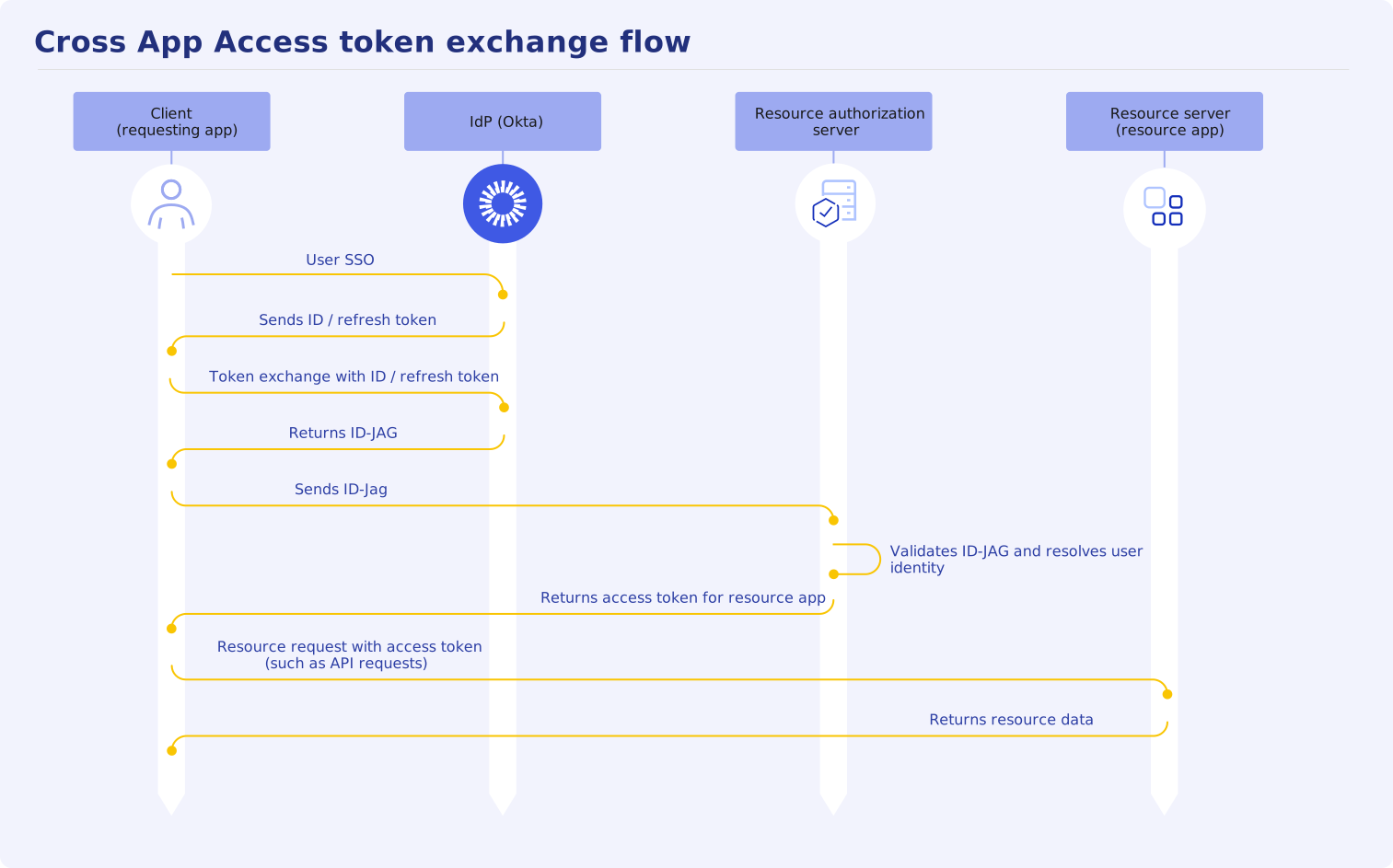
This guide focuses on the interactions required for the agentic app that assumes the Client (requesting app) role in the following XAA token exchange flow:
XAA flow specifics for
requesting app
The following sequence steps follow the XAA token exchange interactions required from the client (the requesting app):
Variables used in the XAA token exchange
You need to pass configuration values from the Okta org and resource server to your requesting app at runtime to complete the XAA flow. The following table provides the variables that you need in your requesting app.
User SSO
Token exchange for ID-JAG
Create a client assertion JWT
Before the token exchange request, create a client assertion JWT ({client_assertion}) for the /token request payload. This assertion is in private_key_jwt format and informs the IdP who the client is. Specify the following claims in your JWT payload:
Claim
Type
Description
aud
String
Set to https://{yourOktaDomain}/oauth2/v1/token (Okta token exchange endpoint). This is the full URL of the resource that you're trying to access using the JWT to authenticate.
iss
String
Set to {clientId}. The AI agent's client ID, which is the issuer of the token.
sub
String
Set to {clientId}. The AI agent's client ID, which the subject of the token.
exp
Integer
The token expiration time in UNIX timestamp format. The request fails from this claim if the expiration time is more than one hour in the future or if the token is already expired.
jti
String
Optional. The unique token identifier. If you specify this parameter, the token can only be used once and, as a result, subsequent token requests don't succeed.
iat
Integer
Optional. When the token was issued in UNIX timestamp format. If specified, it must be a time before the request is received.
Sign your JWT with the client private key from the AI agent ({clientKey}) in Okta. See Build a JWT with a private key(opens new window) for guidance on how to build your JWT with a private key.
Note: Creating a client assertion JWT is unnecessary if your requesting app uses an authentication method other than private_key_jwt. You can pass client ID ({client_id}) and client secret ({client_secret}) directly as token exchange parameters instead.
Send the ID-JAG token exchange request
Exchange ID-JAG for access token
Send the ID-JAG token to the resource authorization server for an access token. Your requesting app uses the {resourceTokenUrl} value to send the access token request. For authorization, the following examples used the Base64-encoded {resourceClientId} and {resourceClientSecret} values. Use the authorization scheme that's supported by the resource server. You need to preconfigure these values in your app or pass them in as a variable (see Variables used in the XAA token exchange).
Access token request example
POST {resourceTokenUrl} HTTP/1.1
Host: the-resource-server.example.com
Content-Type: application/x-www-form-urlencoded
Authorization: Basic <base64({resourceClientId}:{resourceClientSecret})>grant_type=urn:ietf:params:oauth:grant-type:jwt-bearer&assertion={id-jag_token}&scope={IdJagScopes}
The resource authorization server validates the ID-JAG token. It resolves the user ID and verifies that the user has access to the requested resources before returning an access token.
In this example, the resource authorization server returns an access token for the AI agent to use on behalf of the specified user for one hour.
Save the access token value as {resource_access_token} and use it to access the resource APIs.
Client access resource data
The requesting client (AI agent) uses the short-lived, scoped access token to access the protected resource app on the user's behalf. For example:
GET https://{resourceApiUrl}/{resourceXXX}/
Authorization: Bearer {resource_access_token}
Handle token expiration and renewal
Troubleshoot
The following list provides common issues, causes, and resolutions for the XAA token exchange.