Build, Test, and Publish a Cross App Access App in the Okta Integration Network
Cross App Access (XAA) lets your application request data from another vendor’s API on behalf of a signed-in enterprise user, without static API keys and without a separate consent prompt for every connection. If enterprises buy your software, supporting XAA turns your integration into something their IT team can govern centrally.
This guide walks through building XAA support into your app or Model Context Protocol (MCP) server, testing the token exchange with Okta’s developer tools, and publishing the result to the Okta Integration Network (OIN). Listing on the OIN costs nothing.
Table of Contents
- What you’ll build, test, and publish
- Understanding XAA and your app’s use case
- 1. Build and test XAA
- 2. Publish your SSO with XAA integration to the Okta Integration Network
- Need help with your Cross App Access (XAA) submission?
- Learn more about Cross App Access and the Okta Integration Network
What you’ll build, test, and publish
This guide covers two stages:
- Build and test XAA support in your app or MCP server
- Publish your XAA app or MCP server in the OIN. Listing is 100% free!
Complete both and your application appears in the Okta Integration Network as an application that supports Single Sign-On (SSO) and Cross App Access (XAA). XAA depends on SSO, so your OIN listing must cover both integrations.
Understanding XAA and your app’s use case
Cross App Access (XAA) provides a low-friction mechanism for an app to establish secure connections with a third-party resource server. The third-party resource server resides in a separate domain that’s protected by an external authorization server.
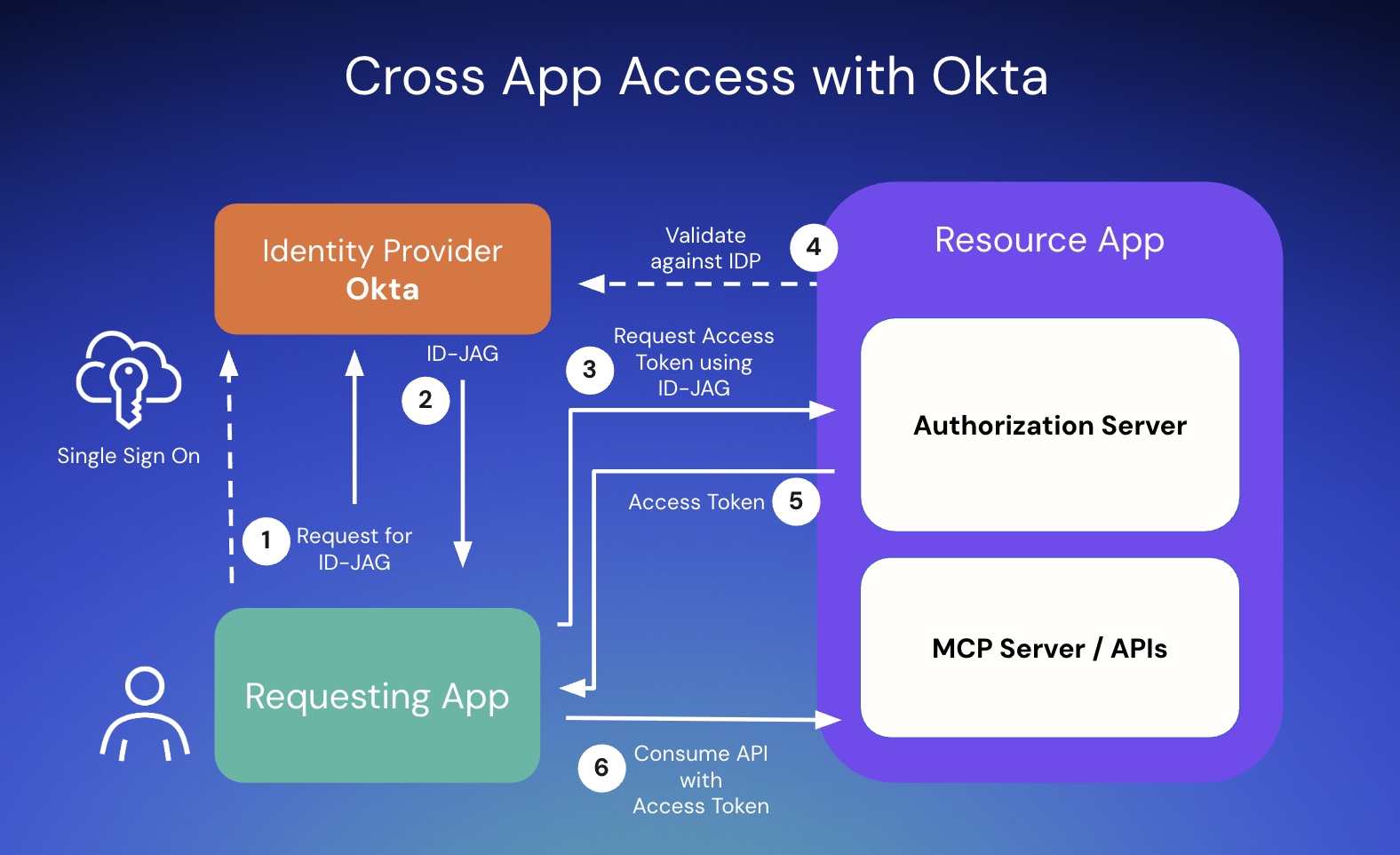
At a high level, XAA involves three distinct roles:
- Requesting app: a requesting app is a client service acting on behalf of an employee. It receives an ID token or Security Assertion Markup Language (SAML) assertion from the identity provider and exchanges that assertion for an Identity Assertion Authorization Grant (ID-JAG), a JSON Web Token (JWT).
- Resource app: a resource app owns the API or data. It validates the incoming ID-JAG and issues a scoped access token if the request is valid.
- Identity Provider (for example, Okta): authenticates the subject, evaluates access policies, and generates and validates the ID-JAG.
Prerequisites for supporting Cross App Access (XAA) in your app
Before you start building XAA, ensure you have these prerequisites in place:
- Register for an Okta Integrator Free Plan org
- Use this production-grade org to build, test, and publish your integration to the OIN
- Determine the use case your app or MCP server supports
- Your application’s XAA role(s) and SSO protocol(s) determine the steps you complete to build, test, and publish:
- XAA role: determine whether your app functions as a requesting app, a resource app, or both
- If you support XAA for Enterprise-Managed Authorization (that is, MCP use cases):
- MCP servers supporting XAA are a resource app use case
- MCP clients supporting XAA are a requesting app use case
- If you support XAA for Enterprise-Managed Authorization (that is, MCP use cases):
- SSO protocol: your app needs to support OpenID Connect (OIDC), SAML, or both
- Whichever protocol most of your customers use determines which guide you select in the following section
- XAA role: determine whether your app functions as a requesting app, a resource app, or both
- Your application’s XAA role(s) and SSO protocol(s) determine the steps you complete to build, test, and publish:
1. Build and test XAA
In this section, you build XAA into your app and test the XAA flow with the developer tools Okta provides.
Select the guide matching your use case, combining the primary SSO protocol your customers use with your XAA role:
- If your app supports SAML SSO:
- If your XAA use case is a resource app, follow our SAML resource app implementation guide
- If your XAA use case is a requesting app, follow our SAML requesting app implementation guide
- If your app supports OIDC SSO:
- If your XAA use case is a resource app, follow our OIDC resource app implementation guide
- If your XAA use case is a requesting app, follow our OIDC requesting app implementation guide
If you are an Auth0 customer, refer to the Auth0 documentation to enable Cross App Access in your Auth0-powered application.
2. Publish your SSO with XAA integration to the Okta Integration Network
Submit your integration from the same Okta Integrator Free Plan org you built in. Follow the OIN Wizard instructions for an SSO with XAA submission.
Our OIN Operations team reviews your submission and contacts you about its status or any issues. Expect about one business week for initial review, with publication to the OIN following shortly after. Track progress on the Your OIN Integrations dashboard in your org.
Need help with your Cross App Access (XAA) submission?
Please reach out to developers@okta.com for help. You can also find answers and connect with peers in Okta’s developer community.
Learn more about Cross App Access and the Okta Integration Network
If this guide helped you plan your OIN and XAA submission, explore these resources next:
- 📘 Cross App Access documentation: official guides for configuring and managing Cross App Access in production.
- 📄 Okta Integration Network documentation: everything you need to get your integration listed on the OIN.
- 🔐 Enabling Cross App Access for SAML-Based Resource Apps: the implementation guide for SAML SSO resource apps.
- 🔐 Enable Your SAML Requesting App for Cross App Access: the implementation guide for SAML SSO requesting apps.
- 🔑 Add Cross App Access to Your OIDC Resource Application: the implementation guide for OIDC SSO resource apps.
- 🔑 Add Cross App Access to Your OIDC Requesting Application: the implementation guide for OIDC SSO requesting apps.
- 🎙️ Developer podcast on MCP and Cross App Access: hear the backstory, use cases, and why this matters for developers.
Follow us on LinkedIn and X, and subscribe to our YouTube channel. Leave a comment below if you have any questions!
Changelog:
- Sep 19, 2026: Rewrote the guide around the self-service OIN Wizard submission flow for Cross App Access, added Model Context Protocol (MCP) role guidance, and removed the manual XAA enablement questionnaire that the wizard replaces. Changes to this article can be viewed in oktadev/okta-blog#1715.
- Aug 24, 2026: Added the OIDC resource and requesting app implementation guides, and removed the superseded OIDC guide link. Changes to this article can be viewed in oktadev/okta-blog#1701.

Gagan is a Group Product Manager at Okta, leading integration capabilities and extensibility. He helps enterprise customers, developers and partners build and scale integrations across the Okta ecosystem. A developer turned product leader, Gagan brings over a decade of experience across enterprise SaaS, customer data platforms, marketing technology, analytics and developer platforms. He is passionate about product, customer research and tinkering with new tech, from AI and hardware experiments to homelab projects. Outside work, you'll find him exploring great coffee, whiskeys and new places.

Alex Silk works on Okta Technology Strategy and AI Ecosystem. With an Okta tenure going on 6 years, Alex is a passionate cloud technologist and an ambassador for identity standards adoption across the ISV ecosystem.
Okta Developer Blog Comment Policy
We welcome relevant and respectful comments. Off-topic comments may be removed.