
On this page
Validate ID-JAG tokens on resource authorization servers
This guide explains how to validate incoming Identity Assertion JWT Authorization Grant (ID-JAG) tokens on your resource authorization server as part of the Cross App Access (XAA) flow.
Learning outcomes
- Accept the
jwt-bearergrant type on your external authorization server. - Parse and validate required headers, signatures, and claims in incoming ID-JAG tokens from Okta, the enterprise Identity Provider (IdP).
- Handle identity resolution for both OIDC and SAML SSO integrations.
- Handle the necessary audit logging and return an access token if validation succeeds.
What you need
- A resource server that provides API access to users
- An authorization server that protects your resource server
Overview
If your authorization server protects your resource app (such as an API server) for the Cross App Access (XAA) flow, it must validate the incoming ID-JAG token and resolve the user's access identity before issuing a scoped access token to the requesting app (client).
See Cross App Access (XAA) for an explanation of XAA and Implement XAA token exchange for your requesting app for a detailed description of the XAA token exchange flow.
This guide focuses on implementing the 6. Validate ID-JAG and resolves user identity step of the XAA token exchange flow, and is based on Access Token Request in the Identity Assertion JWT Authorization Grant (opens new window) specification.
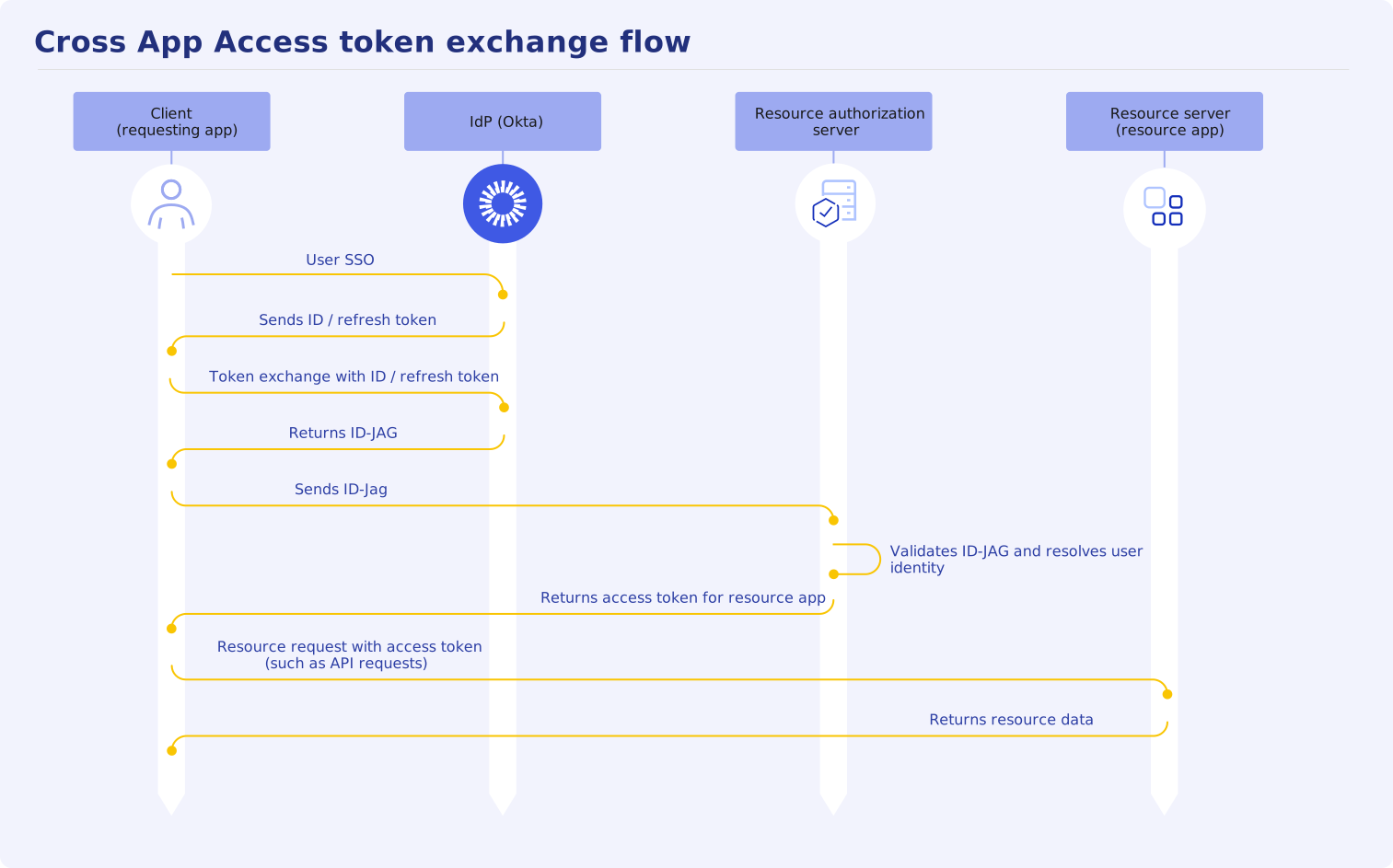
Validate the ID-JAG token and resolve the user identity with the following process:
-
During the token claim validation, you need to resolve the user identity for OIDC or SAML integrations in the request.
Accept the jwt-bearer token request
Configure your authorization server token endpoint (/oauth/v1/token) to accept incoming HTTP POST requests with a Content-Type header set to application/x-www-form-urlencoded and the following request parameters:
Request parameters
| Parameter | Description |
|---|---|
| grant_type | Must be set to urn:ietf:params:oauth:grant-type:jwt-bearer. |
| assertion | The string value of the ID-JAG token issued by the enterprise IdP. |
| scope | Space-delimited list of requested scopes (RFC 6749 (opens new window)). |
For example:
POST /oauth2/v1/token HTTP/1.1
Host: {resourceApiUrl}
Content-Type: application/x-www-form-urlencoded

grant_type=urn%3Aietf%3Aparams%3Aoauth%3Agrant-type%3Ajwt-bearer
&assertion={idJagToken}&
&scope={idJagScopes}
Note: Requesting clients can discover XAA support through your authorization server metadata (
/.well-known/oauth-authorization-server). See Expose XAA metadata for your resource app to implement the well-known discovery metadata resource for your authorization server.
After your authorization server accepts the /token request, decode the ID-JAG token to validate it in the next step.
Validate the decoded header and signature
The ID-JAG token received from Okta is a signed JWT. Okta publishes the public signing keys in a JSON Web Key Set (JWKS) as part of the OAuth 2.0 and OpenID Connect discovery documents. The signing keys are rotated regularly. See keys (opens new window).
See Retrieve the JSON Web Keys and Decode and validate the access token for examples of how to use a JWT verifier in different coding languages.
Validate the decoded header and use the matching key ID (kid) from the fetched Okta JWKS to verify the digital signature:
| Claim | Description/Validation Rule |
|---|---|
Algorithm (alg) | The cryptographic algorithm used to secure the JWT (such as RS256 or ES256). Okta signs JWT using asymmetric encryption (RS256) (opens new window). |
Type (typ) | The required media type of the token. Verify that the type header claim contains oauth-id-jag+jwt. Reject the request if the type header is missing or incorrect. |
Key ID (kid) | The public key identifier used by the IdP (Okta) to sign the token. Retrieve the public signing keys from your Okta domain at https://{yourOktaDomain}/oauth2/v1/keys (opens new window). Note: The Okta org authorization server issues the ID-JAGs. Ensure that your token verification path doesn't contain /default/ or any Okta custom authorization server path. |
For example:
{
  "alg": "RS256",
  "typ": "oauth-id-jag+jwt",
  "kid": "1T4g9ux3EsFK_tpGeqfv7lIccFt9SPV5AqlhrPI2bcR"
}
Validate the decoded claims in the payload
| Claim | Description/Validation Rule |
|---|---|
Issuer (iss) | Verify that the iss claim is present and identifies the enterprise Identity Provider (IdP) that authenticated the user and issued the ID-JAG token. |
Audience (aud) | Verify that the audience matches your authorization server's issuer identifier (the issuer URL). This is the intended audience for the ID-JAG token. |
Expiration (exp) | Ensure that the current time is before the token expiration timestamp. |
JWT ID (jti) | A unique identifier for the specific JWT instance. Use this value to prevent replay attacks. |
Issued at (iat) | A Unix timestamp indicating when the IdP issues the ID-JAG token. |
Client ID (client_id) | Verify that the client_id claim in the ID-JAG matches the authenticated client making the request. This client ID is registered in your authorization server as part of the XAA client metadata or by an admin. |
Tenant (aud_tenant) | In multi-tenant deployments, an additional aud_tenant claim is provided to identify the tenant or domain alias of the enterprise supported by the resource authorization server. In the ID-JAG RFC (opens new window), aud_sub is typically paired with aud_tenant, however, Okta provides only the sub claim in multi-tenant deployments. |
Subject (sub) | Verify that the sub claim is populated with the end user identifier on whose behalf the API request is being made. This claim is the primary key for OIDC SSO user resolution. See Resolve user identity for OIDC integrations. |
Resource (resource) | A string URI or an array of URIs specifying the targeted resource servers. If this claim is present, evaluate the target URI. The granted resources in the access token can be a subset of the resources requested in the ID-JAG based on your authorization server's local policy. |
Subject user identity claims (sub_id) | The sub_id claim contains sub-claims in the Subject Identifier Format for resolving user identity by SAML NameID subject identifiers. This claim is used for SAML SSO user resolution. See Resolve user identity for SAML integrations. |
Subject identifier format (sub_id.format) | For SAML SSO user resolution, verify that the subject identifier format is set to saml_nameid. |
Subject identifier name (sub_id.nameid) | For SAML SSO user resolution, verify that the SAML name identifier string matches an end user. See Resolve user identity for SAML integrations. |
Subject identifier name format (sub_id.nameid_format) | For SAML SSO user resolution, this is the SAML nameid format used. For example, urn:oasis:names:tc:SAML:1.1:nameid-format:emailAddress. |
Subject identifier issuer (sub_id.issuer) | For SAML SSO user resolution, this is the issuer ID for the SAML service provider. See Resolve user identity for SAML integrations. |
Email (email) | The primary email address of the end user subject (sub). |
Scopes (scope) | A space-delimited string of OAuth 2.0 scope values authorized for the token exchange. Verify the scopes with the accessible scopes configured in the authorization server for the resource app. The granted scopes may be a subset of those authorized by the IdP in the ID-JAG assertion. If the requested scope is invalid or exceeds permissions, reject the request with HTTP 403 Forbidden. |
Actor (act) | When the act claim is present, it defines the actor or delegate operating on behalf of the subject (sub). Inspect the optional act claim to identify intermediary entities, such as an AI agent. |
Actor subject (act.sub) | If act is present, the act.sub claim represents the requesting app or AI agent. This is often the same as client_id, which contains the requesting app or AI agent ID. |
Actor subject profile (act.sub_profile) | If act is present, the act.sub_profile claim describes the actor profile, for example ai_agent, service, or web_app. |
Resolve user identity for OIDC integrations
For OIDC-based resource apps, identity resolution is straightforward. The sub claim contains the unique end user identity for the scoped issuer (iss).
If there is a multi-tenant deployment, the aud_tenant claim is provided. You can use aud + aud_tenant + sub claims together to resolve the user's identity. Otherwise, use sub + iss claims to match an end user in the resource app that has access to the requested scopes according to the local policy.
Resolve user identity for SAML integrations
For resolving user identity in SAML integrations, you need the information in the sub_id claim (see Subject Identifier Format (opens new window)).
For SAML-based resource apps, follow these steps to resolve the user's identity:
Resolve the SAML connection from the issuer (
iss) claim before verifying the JWKS signature.Note: Reversing this order creates a critical token-forgery vulnerability in which an attacker can supply an arbitrary victim's SAML issuer in
sub_id.Resolve the user identity using the combination of
sub_id.issuerandsub_id.nameidtogether. Don't resolve user identity onsub_id.nameidalone.
The following pseudocode example creates the SAML connection with the issuer, validates claims, and resolves the user:
connections = {
  "https://atko.okta.com": {
    jwks:            "https://atko.okta.com/oauth2/v1/keys",
    samlIssuer:      "http://www.okta.com/exk1fcia8zMValiD0h8",
  },
}

redeem(idJag, authenticatedClient):
    // Create the connection with iss before trusting the signature.
    iss  = unverified_issuer(idJag)
    conn = connections[iss]
    if conn is none: reject "invalid_grant"

    // Verify signature against the specific issuers JWKS.
    payload = verify_jwt(idJag, jwks = conn.jwks)
    if payload is invalid: reject "invalid_grant"

    // Perform header and payload claim checks.
    require payload.typ       == "oauth-id-jag+jwt"
    require payload.aud       == "resource_authorization_server_url"
    require payload.client_id == authenticatedClient.id

    user  = resolveSamlSubject(payload.sub_id, conn)
    scope = applyScopePolicy(user, payload.scope)
    return issueAccessToken(user, scope)

resolveSamlSubject(subId, conn):
    require subId and subId.format == "saml-nameid"
    require subId.issuer == conn.samlIssuer

    user = lookup_user_by_saml_nameid(subId.issuer, subId.nameid)
    if user is none: reject "invalid_grant"
    return user
Issue an access token and record audit logs
After claims are validated and user identity is resolved, complete the exchange:
Log audit properties of the request and validation for compliance and troubleshooting, such as:
- User identity (
sub) - Requesting app identity (
client_id) - Granted OAuth 2.0 scopes
- Request timestamp
- User identity (
Issue a short-lived access token if all validation checks succeed. Return an HTTP
200 OKresponse that contains a standard JSON token payload with the access token. For example:HTTP/1.1 200 OK Content-Type: application/json;charset=UTF-8 Cache-Control: no-store Pragma: no-cache { "access_token": "eyJhbGciOiJSUzI1NiI...", "token_type": "Bearer", "expires_in": 3600, "scope": "reports.read:analytics" }
Note: Don't issue refresh tokens in response to an ID-JAG token exchange. Requesting apps must submit a new ID-JAG token when their access token expires.
Handle errors and troubleshoot
Return standard HTTP status codes and OAuth error responses when validation fails (see RFC 6749 Section 5.2 (opens new window)):
| Error scenario | HTTP status | Error response body | Resolution |
|---|---|---|---|
Missing or invalid grant_type | 400 Bad Request | unsupported_grant_type | The grant type must be urn:ietf:params:oauth:grant-type:jwt-bearer. |
Signature invalid or typ mismatch | 400 Bad Request | invalid_grant | The ID-JAG signature is invalid or typ isn't oauth-id-jag+jwt. |
Unknown client_id | 400 Bad Request | invalid_client | The client ID doesn't match the server configuration or request context. |
| Requested scope exceeds ID-JAG | 400 Bad Request | invalid_scope | Requested scopes exceed those granted in the assertion or local policy. |
Assertion expired (exp) | 400 Bad Request | invalid_grant | The ID-JAG assertion has expired. |
Mismatched aud claim | 400 Bad Request | invalid_grant | Check for trailing slashes or host mismatches between the configuration and the token. |
Missing sub or act.sub | 400 Bad Request | invalid_grant | Verify that the requesting app generated a valid ID-JAG that contains both user and actor claims. |
For example:
HTTP/1.1 400 Bad Request
Content-Type: application/json;charset=UTF-8
Cache-Control: no-store

{
  "error": "invalid_grant",
  "error_description": "The assertion typ header MUST be oauth-id-jag+jwt."
}
Next steps
- Test your implementation: Verify your end-to-end token validation flow using the testing harness at xaa.dev (opens new window).
- Expose XAA metata authorization server: See Expose XAA metata for your resource app and authorization server so that requesting clients and the IdP can discover your protected resource.
- Submit to OIN: Publish your resource app integration to the Okta Integration Network (OIN) catalog.
- Configure AI agent to resources with XAA: See Configure AI agent-to-app with XAA.
