
On this page
Connect MCP servers to downstream resources
Learn how to configure an MCP server to act as an OAuth client. The MCP server exchanges the token that it receives from an AI agent for a separate token that's issued for a downstream resource.
Learning outcomes
- Enable an MCP server as an OAuth client.
- Add an active public key to the MCP server's credentials.
- Create a resource connection on the MCP server that defines the downstream resource it's allowed to access.
- Understand the token exchange flow that the MCP server uses to get a downstream token.
What you need
- An Okta org that's subscribed to Okta for AI Agents and an Okta admin account with a super admin role
- The MCP server as an OAuth client feature enabled for your org. Contact Okta Support (opens new window) to enable it. To use the
IDENTITY_ASSERTION_MCP_SERVERconnection type in Variant: MCP-to-MCP chaining, also ask Support to enable downstream MCP server connections. - Custom scopes defined in the Okta custom authorization server that protects the downstream resource. These scopes specify what permissions the token exchange grants in the final access token.
- An MCP server registered in your Okta org. See Add an MCP Server manually (opens new window).
- An AI agent or client that has a delegation link to the MCP server.
Note: In the link,
to.resourceOrnis theoauthClient.ornvalue of the MCP server, not the ORN of the MCP server resource. See Create a delegation link (opens new window). - An access token (T1) that the AI agent or client passes to the MCP server. See Authenticate with Okta.
Note: Complete these prerequisites before you start. This guide begins when the AI agent or client presents T1 to the MCP server.
Overview
An MCP server typically handles inbound requests from AI agents. Sometimes the MCP server must also call a downstream resource, such as another MCP server, to complete a request. In that case, the MCP server acts as an OAuth client.
The MCP server never passes on the access token that it receives. That token was issued for the MCP server, not for the downstream resource. Passing it on would let the downstream resource treat the MCP server's token as its own. It would also let a caller use the MCP server to reach resources that the caller can't access. This is known as a confused deputy problem.
Instead, the MCP server exchanges the token for a separate token. The authorization server that protects the downstream resource issues that token.
This guide covers a downstream MCP server that's protected by an Okta custom authorization server. Okta supports this through Cross App Access (opens new window), which uses the Identity Assertion JWT (ID-JAG).
The MCP server handles both user and machine subjects. This includes the exchange of the ID-JAG for a downstream access token. See Exchange ID-JAG for access token.
Note: An MCP server can also hold other connection types. Use
IDENTITY_ASSERTION_MCP_SERVERfor a downstream MCP server. See Variant: MCP-to-MCP chaining.
Token exchange flow
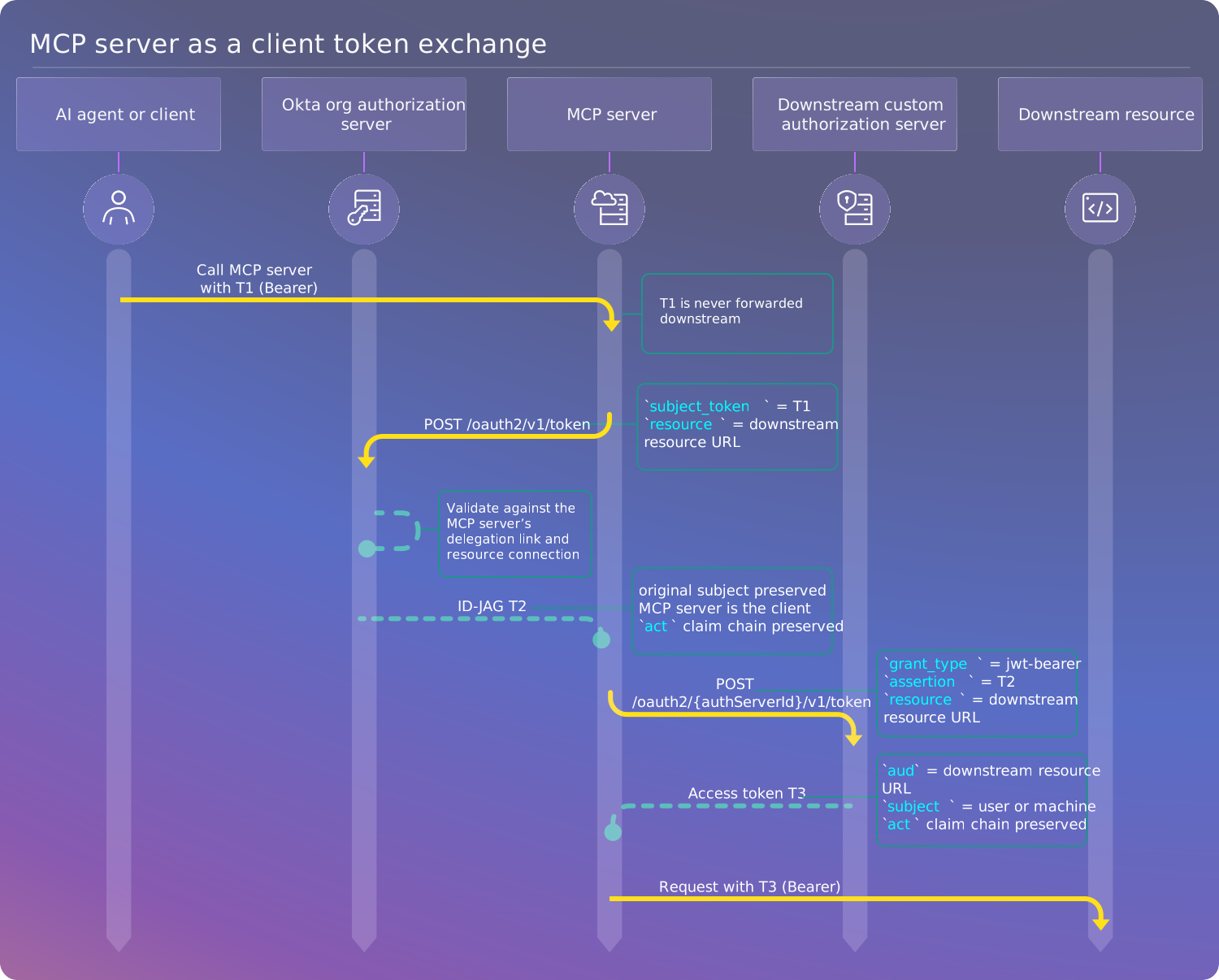
The following diagram describes the token exchange flow for an MCP server acting as a client. The flow starts when the AI agent or client presents the access token (T1) to the MCP server.
Flow steps
The following steps show how an AI agent or client calls an MCP server and how the MCP server gets a downstream token.
The AI agent calls the MCP server and passes the access token (T1).
Note: The MCP server doesn't forward T1 to the downstream resource. It always requests a separate token that's issued for the downstream resource.
The MCP server sends the
subject_token(T1) to the/tokenendpoint at the org authorization server and requests an exchange for an ID-JAG token (urn:ietf:params:oauth:token-type:id-jag). The MCP server authenticates as an OAuth client using theprivate_key_jwt.The server performs validation based on the Resource Connections configuration and returns the requested ID-JAG (T2). T2 keeps the original subject and identifies the MCP server as the client. Its
actclaim lists the MCP server as the actor and nests the actors from T1. See Delegation chain and the act claim and Exchange subject token for resource token for an example request.Because the requested credential was an ID-JAG, the MCP server sends the ID-JAG (T2) to the custom authorization server that protects the downstream resource.
The server performs validation and returns an access token (T3). T3 keeps the original subject and identifies the MCP server as the client. Its
actclaim has the same nested chain as T2.The MCP server uses the access token (T3) to request access to the downstream resource.
Set up the MCP server as an OAuth client
Before an MCP server can exchange tokens, you must enable it as an OAuth client, add a public key, and create a resource connection. Use the MCP Server Client Registration (opens new window), MCP Server Credentials (opens new window), and MCP Server Connections (opens new window) APIs to complete these steps.
Note: The requests in this section use an OAuth 2.0 access token. The token needs the
okta.resourceServers.mcpServers.managescope to make changes and theokta.resourceServers.mcpServers.readscope to read. See Implement OAuth for Okta with a service app to get an access token with these scopes. To use a signed-in admin instead, see Implement OAuth for Okta.
Enable the OAuth client
Enabling an MCP server as an OAuth client is an explicit step. Okta doesn't enable it when you register the MCP server, add a connection, or add a key.
Send a POST request to create the OAuth client. This request has no body. See Create an MCP server OAuth client (opens new window).
  curl --location --request POST \
    --url 'https://{yourOktaDomain}/workload-principals/api/v1/mcp-servers/{mcpServerId}/oauth-client' \
    --header "Accept: application/json" \
    --header "Authorization: Bearer {accessToken}"
This single request creates and activates the OAuth client. You don't need a separate activation call.
The response is 201 Created with an empty body. An MCP server has only one OAuth client, so the request returns 409 if one exists.
Get the client ID
Retrieve the MCP server and read the oauthClient property. The clientId is the OAuth client ID that the MCP server uses in the token exchange requests.
  curl --location --request GET \
    --url 'https://{yourOktaDomain}/resource-servers/api/v1/mcp-servers/{mcpServerId}' \
    --header "Accept: application/json" \
    --header "Authorization: Bearer {accessToken}"
The oauthClient property in the response contains the following values:
{
  "oauthClient": {
    "clientId": "wlp8nUa7p0g4zrZbs2f4",
    "orn": "orn:okta:directory:00o1gjjp4jsdR3Sww4x7:workload-principals:mcp:wlp8nUa7p0g4zrZbs2f4",
    "status": "ACTIVE",
    "tokenEndpointAuthMethod": "private_key_jwt",
    "grantTypes": [
      "urn:ietf:params:oauth:grant-type:token-exchange",
      "urn:ietf:params:oauth:grant-type:jwt-bearer"
    ],
    "connectionCount": 0
  }
}
Okta sets the tokenEndpointAuthMethod and grantTypes values, and you can't change them.
| Property | Description |
|---|---|
clientId | The OAuth client ID that the MCP server uses in token exchange requests |
orn | The ORN of the OAuth client. Use it as to.resourceOrn when you create a delegation link (opens new window). |
status | The status of the OAuth client. A new client is ACTIVE. |
tokenEndpointAuthMethod | How the MCP server authenticates to Okta. The value is always private_key_jwt. |
grantTypes | The grant types that the client can use: token exchange and JWT bearer |
connectionCount | The number of resource connections on the MCP server |
Add a public key
The MCP server signs its client assertion with a private key. Add the matching public key to the MCP server's credentials so that Okta can verify the assertion. See Add an MCP server JWK (opens new window).
  curl --location --request POST \
    --url 'https://{yourOktaDomain}/workload-principals/api/v1/mcp-servers/{mcpServerId}/credentials/jwks' \
    --header "Content-Type: application/json" \
    --header "Accept: application/json" \
    --header "Authorization: Bearer {accessToken}" \
    --data '{
      "kty": "RSA",
      "use": "sig",
      "alg": "RS256",
      "kid": "mcp-server-key-1",
      "n": "{modulus}",
      "e": "AQAB"
    }'
The request body depends on the key type:
- RSA key requires:
kty,n, ande - EC key requires:
kty,x,y, andcrv
The use value is always sig. The alg and kid properties are optional.
The response is 201 Created and includes the key's id, which identifies the key in later requests. New keys are ACTIVE by default. To add a key without activating it, set status to INACTIVE in the request.
If you added the key with the INACTIVE status, activate it. Replace {keyId} with the id of the key from the add response, not the kid.
  curl --location --request POST \
    --url 'https://{yourOktaDomain}/workload-principals/api/v1/mcp-servers/{mcpServerId}/credentials/jwks/{keyId}/lifecycle/activate' \
    --header "Accept: application/json" \
    --header "Authorization: Bearer {accessToken}"
Rotate a key
To rotate a key, add the new key and make sure that it's active. Then deactivate the old key. Okta accepts assertions signed by any active key, so both keys work during the changeover.
Note: Okta doesn't allow you to deactivate the last active key while the MCP server has active connections. The request returns a
409 Conflicterror with theDEACTIVATE_NOT_ALLOWEDerror. Activate the new key before you deactivate the old one.
Create a resource connection
A resource connection defines the downstream resource that the MCP server can reach. The MCP server needs one connection for each downstream resource. Each token exchange returns a token for one resource.
Create a connection of type IDENTITY_ASSERTION_CUSTOM_AS for a downstream resource that an Okta custom authorization server protects. See Create an MCP server connection (opens new window).
  curl --location --request POST \
    --url 'https://{yourOktaDomain}/workload-principals/api/v1/mcp-servers/{mcpServerId}/connections' \
    --header "Content-Type: application/json" \
    --header "Accept: application/json" \
    --header "Authorization: Bearer {accessToken}" \
    --data '{
      "connectionType": "IDENTITY_ASSERTION_CUSTOM_AS",
      "resourceIndicator": "https://downstream-api.example.com",
      "authorizationServer": {
        "orn": "orn:okta:idp:{orgId}:authorization_servers:{authServerId}"
      },
      "scopeCondition": "INCLUDE_ONLY",
      "scopes": [
        "tools:read",
        "tools:execute"
      ]
    }'
| Property | Description and value |
|---|---|
connectionType | The type of connection. Use IDENTITY_ASSERTION_CUSTOM_AS for any downstream resource that's protected by an Okta custom authorization server. |
resourceIndicator | Optional. The URL of the downstream resource. If you don't specify a value, Okta uses the default audience of the custom authorization server. Use the same value as the resource parameter in the token exchange requests. If the values don't match, the token exchange fails with a 400 invalid_target error. If a request omits resource, Okta matches the connection on the issuer only. |
authorizationServer.orn | The ORN of the custom authorization server that protects the downstream resource |
scopeCondition | Controls how Okta applies the scopes list. INCLUDE_ONLY limits the connection to the listed scopes. |
scopes | The scopes that the MCP server can request at the downstream resource |
The response is 201 Created and includes the new connection:
{
  "id": "mcn8nUa7p0g4zrZbs2f4",
  "orn": "orn:okta:idp:00o1gjjp4jsdR3Sww4x7:connections:mcn8nUa7p0g4zrZbs2f4",
  "connectionType": "IDENTITY_ASSERTION_CUSTOM_AS",
  "status": "ACTIVE",
  "resourceIndicator": "https://downstream-api.example.com",
  "authorizationServer": {
    "name": "{authServerName}",
    "issuerUrl": "https://{yourOktaDomain}/oauth2/{authServerId}",
    "orn": "orn:okta:idp:00o1gjjp4jsdR3Sww4x7:authorization_servers:{authServerId}",
    "_links": {
      "self": {
        "href": "/api/v1/authorizationServers/{authServerId}"
      }
    }
  },
  "scopeCondition": "INCLUDE_ONLY",
  "scopes": [
    "tools:read",
    "tools:execute"
  ],
  "_links": {
    "self": {
      "href": "/workload-principals/api/v1/mcp-servers/{mcpServerId}/connections/mcn8nUa7p0g4zrZbs2f4"
    }
  }
}
| Property | Description and value |
|---|---|
id | The ID of the connection. Use it to identify the connection in later requests, such as a DELETE request. |
orn | The ORN of the connection |
status | The status of the connection. New connections are ACTIVE. |
authorizationServer.name | The name of the custom authorization server |
authorizationServer.issuerUrl | The issuer URL of the custom authorization server |
The response also returns the values that you sent in the request.
Note: You can't change the
connectionTypeor the downstream resource after you create the connection. To point a connection at a different resource, delete it, and create another one.
To connect to a downstream MCP server that's registered in your org, see Variant: MCP-to-MCP chaining.
Delete the OAuth client
When you delete the MCP server, Okta automatically deletes its connections, keys, and OAuth client. You don't need to remove them first.
To delete the OAuth client but keep the MCP server, remove the client's resources in this order:
- Delete its connections first. Okta doesn't allow you to deactivate the last active key while active connections remain. For each connection, send a
DELETErequest to/workload-principals/api/v1/mcp-servers/{mcpServerId}/connections/{connectionId}. - Deactivate its keys. Send a
POSTrequest to/workload-principals/api/v1/mcp-servers/{mcpServerId}/credentials/jwks/{keyId}/lifecycle/deactivate. - Delete its keys. Deactivate a key before you delete it. Send a
DELETErequest to/workload-principals/api/v1/mcp-servers/{mcpServerId}/credentials/jwks/{keyId}. - Delete the OAuth client. Send a
DELETErequest to/workload-principals/api/v1/mcp-servers/{mcpServerId}/oauth-client. The response is204 No Content.
The request to delete the OAuth client returns 409 if any active connections or active keys remain. Deactivated keys don't block the request.
Exchange tokens for the downstream resource
After you set up the MCP server as an OAuth client, it can exchange the token that it receives for a downstream resource token.
Exchange subject token for resource token
In this step, the MCP server receives the access token (T1) from the AI agent. It then sends a POST request to the Okta org authorization server's /token endpoint to exchange T1 for an ID-JAG resource token (T2). The exchange establishes the MCP server as the immediate actor in the delegation chain and keeps the original subject.
The MCP server authenticates with private_key_jwt. It signs the client assertion with an active key from its credentials.
Note: See Client authentication methods (opens new window) for more details on each type of authentication method.
In the following request, the scope value lists scopes that are defined on the downstream custom authorization server. They aren't the MCP server's own scopes.
  curl --location --request POST \
    --url 'https://{yourOktaDomain}/oauth2/v1/token' \
    --header "Content-Type: application/x-www-form-urlencoded" \
    --header "Accept: application/json" \
    --data-urlencode "grant_type=urn:ietf:params:oauth:grant-type:token-exchange" \
    --data-urlencode "subject_token=eyJraWQiOiJQLVgxeC1ITWtuSThPS0lUeE5TWVlsMHR0bl...." \
    --data-urlencode "subject_token_type=urn:ietf:params:oauth:token-type:access_token" \
    --data-urlencode "requested_token_type=urn:ietf:params:oauth:token-type:id-jag" \
    --data-urlencode "audience=https://{yourOktaDomain}/oauth2/{authServerId}" \
    --data-urlencode "resource=https://downstream-api.example.com" \
    --data-urlencode "scope=tools:read tools:execute" \
    --data-urlencode "client_id={mcpServerClientId}" \
    --data-urlencode "client_assertion_type=urn:ietf:params:oauth:client-assertion-type:jwt-bearer" \
    --data-urlencode "client_assertion=eyJhbGciOiJSUzI1NiIsInR5…[jwt]"
| Parameter | Description and value |
|---|---|
grant_type | Standard OAuth 2.0 token exchange grant. The value must be urn:ietf:params:oauth:grant-type:token-exchange. |
subject_token | The access token (T1) that the MCP server received from the AI agent. Never use this token as the downstream token. |
subject_token_type | The type of subject token. The value must be urn:ietf:params:oauth:token-type:access_token. |
requested_token_type | The type of token being requested. The value must be urn:ietf:params:oauth:token-type:id-jag. |
audience | The issuer URL of the custom authorization server that protects the downstream resource |
resource | The resource URL of the downstream resource. This must match the resource in the MCP server's resource connection. |
scope | A list of scopes that the MCP server requests at the downstream custom authorization server. These aren't the MCP server's own scopes. They define the permissions for the final access token. |
client_id | The MCP server's OAuth client ID. This is the clientId value in the oauthClient property of the MCP server. See Get the client ID. |
client_assertion_type | The type of assertion for client authentication. The value must be urn:ietf:params:oauth:client-assertion-type:jwt-bearer. |
client_assertion | A signed JWT used for client authentication. Sign the JWT using an active key from the MCP server's credentials. For more information on building the JWT, see JWT with private key (opens new window). |
Response
The response contains an ID-JAG token (T2). The ID-JAG keeps the subject of T1. The MCP server's client ID is the client_id claim.
HTTP/1.1 200 OK
Content-Type: application/json
Cache-Control: no-store
Pragma: no-cache

{
  "token_type": "N_A",
  "expires_in": 300,
  "access_token": "eyJraWQiOiJQLVgxeC1ITWtuSThPS0lUeE5TWV...",
  "issued_token_type": "urn:ietf:params:oauth:token-type:id-jag"
}
Note: The
access_tokenfield contains the ID-JAG, not an access token. Theissued_token_typevalue,urn:ietf:params:oauth:token-type:id-jag, identifies the token type. You can't use this token to call a resource. Exchange it for an access token in the next step.
The ID-JAG carries the act claim from T1 with the MCP server added as the outermost actor. See Delegation chain and the act claim.
The ID-JAG contains the following claims:
{
   "jti": "IDAAG.15z85431lDHGQX42uOqUJ_DPt8zQFpSQtmtrHf-tAi8",
   "iss": "https://{yourOktaDomain}",
   "aud": "https://{yourOktaDomain}/oauth2/{authServerId}",
   "iat": 1780596934,
   "exp": 1780597234,
   "sub": "{userId}",
   "email": "{userEmail}",
   "resource": "https://downstream-api.example.com",
   "client_id": "{mcpServerClientId}",
   "sub_profile": "user",
   "scope": "tools:read tools:execute",
   "act": {
      "sub": "{mcpServerClientId}",
      "sub_profile": "mcp_server",
      "act": {
         "sub": "{aiAgentClientId}",
         "sub_profile": "ai_agent web_app"
      }
   }
}
| Claim | Description |
|---|---|
sub | The subject of T1 |
email | The email address of the subject. This claim is present only when the subject is a user. |
client_id | The OAuth client ID of the MCP server that performed the exchange |
sub_profile | The type of the subject, such as user or service |
act | The actor chain. The MCP server is the outermost actor, and the AI agent or client that called the MCP server is nested inside it. |
resource | The resource URL of the downstream resource |
aud | The issuer URL of the custom authorization server that protects the downstream resource |
Exchange ID-JAG for access token
After receiving the ID-JAG, the MCP server sends a POST request to the custom authorization server's /token endpoint. This request exchanges the ID-JAG (T2) for an access token (T3) that the MCP server uses to call the downstream resource.
The access policy of the downstream custom authorization server must include the MCP server's OAuth client. It must also have a rule that allows the JWT bearer grant for the scopes that you request. Without it, the server rejects the request with the access_denied error and the message Policy evaluation failed for this request. The MCP server's client doesn't have a display name in the Admin Console, so you can't easily select it in the policy. The simplest approach is to assign the policy to All clients. To limit the policy to the MCP server's client, use the Authorization Server Rules API (opens new window) and specify the client ID.
This exchange works for both user and machine subjects.
  curl --location --request POST \
    --url 'https://{yourOktaDomain}/oauth2/{authServerId}/v1/token' \
    --header "Content-Type: application/x-www-form-urlencoded" \
    --header "Accept: application/json" \
    --data-urlencode "grant_type=urn:ietf:params:oauth:grant-type:jwt-bearer" \
    --data-urlencode "assertion=eyJraWQiOiJuc3MwV3UyblE4...[jwt-id-jag]" \
    --data-urlencode "resource=https://downstream-api.example.com" \
    --data-urlencode "client_id={mcpServerClientId}" \
    --data-urlencode "client_assertion_type=urn:ietf:params:oauth:client-assertion-type:jwt-bearer" \
    --data-urlencode "client_assertion=eyJhbGciOiJSUzI1NiIsInR5...[jwt]"
| Parameter | Description and value |
|---|---|
grant_type | The value must be urn:ietf:params:oauth:grant-type:jwt-bearer |
assertion | The ID-JAG that's received in the Exchange subject token for resource token response. |
resource | The resource URL of the downstream resource. Use the same value as in the ID-JAG exchange. |
client_id | The MCP server's OAuth client ID. Use the same value as in the ID-JAG exchange. |
client_assertion_type | The type of assertion. The value must be urn:ietf:params:oauth:client-assertion-type:jwt-bearer. |
client_assertion | A signed JWT that's used for client authentication. Sign the JWT using an active key from the MCP server's credentials. |
The request doesn't need a scope parameter. Okta takes the scopes for the access token from the ID-JAG.
Response
The response contains a new access token (T3) that's issued for the downstream resource.
{
  "token_type": "Bearer",
  "expires_in": 3600,
  "access_token": "eyJraWQiOiJQLVgxeC1ITWtuSThPS0lUeE5TWVlsMHR0blJobUY4Q0xTaUdBenlwemJVIiwiYWxnIjoi...",
  "scope": "tools:read tools:execute"
}
The access token contains the following claims. The act claim lists the MCP server as the outermost actor and nests the actors from T1. See Delegation chain and the act claim.
{
  "ver": 1,
  "jti": "AT.PuAPw4ornR4HezKipVQx7l0h1PVMXjgA_FjS80QfQGc",
  "iss": "https://{yourOktaDomain}/oauth2/{authServerId}",
  "aud": "https://downstream-api.example.com",
  "iat": 1780596935,
  "exp": 1780600535,
  "cid": "{mcpServerClientId}",
  "uid": "{userId}",
  "scp": [
    "tools:read",
    "tools:execute"
  ],
  "auth_time": 1780596935,
  "sub": "{userEmail}",
  "act": {
    "sub": "{mcpServerClientId}",
    "sub_profile": "mcp_server",
    "act": {
      "sub": "{aiAgentClientId}",
      "sub_profile": "ai_agent web_app"
    }
  },
  "sub_profile": "user"
}
| Claim | Description |
|---|---|
cid | The OAuth client ID of the MCP server |
uid | The ID of the user. This claim is present only when the subject is a user. |
sub | The subject of T1 |
act | The actor chain. The MCP server is the outermost actor, and the AI agent or client that called the MCP server is nested inside it. |
sub_profile | The type of the subject, such as user or service |
The aud claim is the downstream resource URL. It differs from the aud claim in T1, which is the MCP server's own resource URL.
Access the downstream resource
The MCP server uses the access token (T3) to request access to the downstream resource. The downstream resource can verify the complete delegation chain from the act claim in T3.
Note: One token exchange returns a token for one audience. To reach several downstream resources, create a resource connection for each one and run a separate exchange for each.
Delegation chain and the act claim
The act claim records the actors in a delegation chain. Each exchange keeps the act claim from the subject token and adds the client that performed the exchange as the outermost actor.
The MCP server's exchange adds the MCP server as the outermost actor and nests the act claim from T1 inside it. T2 and T3 carry the same chain. The MCP server is also the client, in the client_id claim of T2 and the cid claim of T3.
For example, the act claim in T2 and T3 looks like this:
"act": {
  "sub": "{mcpServerClientId}",
  "sub_profile": "mcp_server",
  "act": {
    "sub": "{aiAgentClientId}",
    "sub_profile": "ai_agent web_app"
  }
}
The original subject stays the same across all tokens. The downstream resource can use the act claim in T3 to see the MCP server and the AI agent or client that started the request.
The delegation chain has a maximum depth of five actors. If the act chain exceeds this limit, Okta rejects the exchange and returns the invalid_subject_token_act_claim_depth OAuth error.
Variant: MCP-to-MCP chaining
Use the IDENTITY_ASSERTION_MCP_SERVER connection type when the downstream resource is another MCP server in your org. The MCP server reaches it through the ID-JAG and the downstream MCP server's custom authorization server. This connection type needs an additional feature enabled for your org. See What you need.
The token exchange steps, T2 and T3, are the same as for IDENTITY_ASSERTION_CUSTOM_AS. Only the connection differs.
Create the connection:
  curl --location --request POST \
    --url 'https://{yourOktaDomain}/workload-principals/api/v1/mcp-servers/{mcpServerId}/connections' \
    --header "Content-Type: application/json" \
    --header "Accept: application/json" \
    --header "Authorization: Bearer {accessToken}" \
    --data '{
      "connectionType": "IDENTITY_ASSERTION_MCP_SERVER",
      "resource": {
        "orn": "orn:okta:directory:{orgId}:resource-servers:mcp:{downstreamMcpServerId}"
      },
      "authorizationServer": {
        "orn": "orn:okta:idp:{orgId}:authorization_servers:{authServerId}"
      },
      "scopeCondition": "INCLUDE_ONLY",
      "scopes": [
        "tools:read",
        "tools:execute"
      ]
    }'
| Property | Description and value |
|---|---|
connectionType | The type of connection. Use IDENTITY_ASSERTION_MCP_SERVER for a downstream MCP server that's protected by an Okta custom authorization server. |
resource.orn | The ORN of the downstream MCP server |
authorizationServer.orn | The ORN of the custom authorization server that protects the downstream MCP server |
scopeCondition | Controls how Okta applies the scopes list. INCLUDE_ONLY limits the connection to the listed scopes. |
scopes | The scopes that the MCP server can request at the downstream resource |
The response is 201 Created and includes the new connection:
{
  "id": "mcn8nUa7p0g4zrZbs2f4",
  "orn": "orn:okta:idp:00o1gjjp4jsdR3Sww4x7:connections:mcn8nUa7p0g4zrZbs2f4",
  "connectionType": "IDENTITY_ASSERTION_MCP_SERVER",
  "status": "ACTIVE",
  "resource": {
    "name": "{downstreamMcpServerName}",
    "orn": "orn:okta:directory:00o1gjjp4jsdR3Sww4x7:resource-servers:mcp:{downstreamMcpServerId}",
    "_links": {
      "self": {
        "href": "/resource-servers/api/v1/mcp-servers/{downstreamMcpServerId}"
      }
    }
  },
  "resourceIndicator": "https://{downstreamMcpServerUrl}/mcp",
  "authorizationServer": {
    "name": "{authServerName}",
    "issuerUrl": "https://{yourOktaDomain}/oauth2/{authServerId}",
    "orn": "orn:okta:idp:00o1gjjp4jsdR3Sww4x7:authorization_servers:{authServerId}",
    "_links": {
      "self": {
        "href": "/api/v1/authorizationServers/{authServerId}"
      }
    }
  },
  "scopeCondition": "INCLUDE_ONLY",
  "scopes": [
    "tools:read",
    "tools:execute"
  ],
  "_links": {
    "self": {
      "href": "/workload-principals/api/v1/mcp-servers/{mcpServerId}/connections/mcn8nUa7p0g4zrZbs2f4"
    }
  }
}
| Property | Description and value |
|---|---|
id | The ID of the connection. Use it to identify the connection in later requests, such as a DELETE request. |
orn | The ORN of the connection |
status | The status of the connection. New connections are ACTIVE. |
resource.name | The name of the downstream MCP server |
resourceIndicator | The URL of the downstream MCP server. Okta sets this value from the downstream MCP server's resource URL. |
authorizationServer.name | The name of the custom authorization server |
authorizationServer.issuerUrl | The issuer URL of the custom authorization server |
The response also returns the values that you sent in the request.
Note: You can't change the
connectionTypeor the downstream resource after you create the connection. To point a connection at a different resource, delete it, and create another one.
Revoke tokens
The access token issued by the custom authorization server is a standard Okta access token. You can revoke regular access tokens from Okta. For details, see Revoke Tokens and User sign out (local app).
