
On this page
API integration actions
API integration actions enable you to build Okta integrations with capabilities, such as provisioning, entitlement management, and Universal Logout, using third-party APIs. API integration actions are available through the low-code Workflows Integration Builder. These integrations are called by Okta for API actions, such as retrieving and updating entitlements or triggering a risk-based logout.
Integration Builder
Integration Builder is an environment for independent software vendors (ISVs) to build, test, and deploy integrations privately or to the Okta Integration Network (OIN). It's exclusively available in Okta Integrator Free Plan orgs and integrates seamlessly with the OIN Wizard submission flow.
Note: Integration Builder is an evolution of the Workflows Connector Builder. See Integration Builder (opens new window) and Connector Builder (opens new window) in the Workflows product documentation.
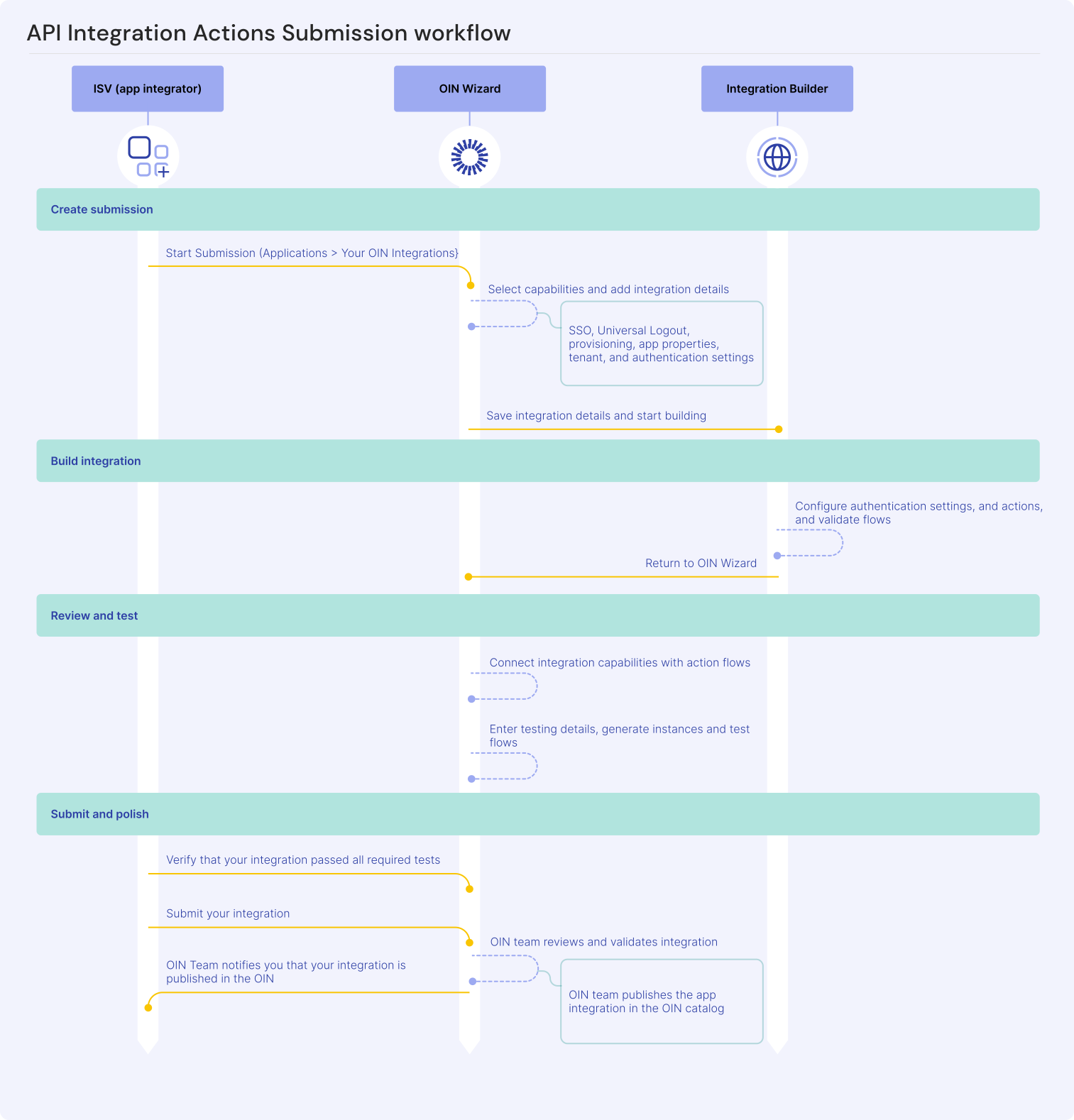
As an ISV, start building your integration in the OIN Wizard by defining your integration name and capabilities. The OIN Wizard directs you to the corresponding integration project within the Integration Builder. Build your API integration actions and validate the flows in the Integration Builder before returning to the OIN Wizard. Test your integration in the OIN Wizard and submit it for OIN distribution.
Note: See OIN submission requirements before using the OIN Wizard to submit your integration.
Process overview
- Start your submission in the OIN Wizard. See Submit an integration with API integration actions.
- Build your API integration actions in the Integration Builder by following the Build an integration with API integration actions guide. Define the authentication and action flows to your API server.
- Return to the OIN Wizard to complete the integration configuration and testing. The actions you define in the Integration Builder become available in the OIN Wizard for real-time testing.
- Submit for validation through the OIN Wizard once you're satisfied with your integration's functionality.
Note: You can create an integration by navigating directly to the Integration Builder in your Okta Integrator Free Plan org. However, you have to manually connect your Integration Builder project to your OIN submission before you can validate and submit your integration. Okta recommends accessing the Integration Builder through the OIN Wizard, which shares integration details so you don't have to enter them twice.
Next steps
Ready to get started? Sign up for a free Okta Integrator Free Plan org and see Submit an integration with API integration actions.
Post your questions on the Okta Developer Forum (opens new window) if you need help or have an issue.
