
On this page
Integrate Okta with identity verification vendors
Developers and organizations can use identity verification (IDV) vendors to integrate IDV flows into their authentication processes.
This guide shows developers of IDV vendors how their IDV solutions integrate with Okta orgs.
Learning outcome
Understand the standardized process of how IDV vendors integrate with Okta.
What you need
- An IDV service that has an app and IDV flow
- Okta Integrator Free Plan org (opens new window)
- An Okta account management policy enabled
About identity verification and IDV vendors
IDV vendors typically verify the identities of users by requiring them to submit a proof of identity. The proof of identity matches a user’s digital identity against a trusted data source. IDV vendors provide IDV flows as part of their services. Okta admins and developers can work with IDV vendors to integrate their IDV flows into their orgs.
IDV flows are customizable and can be configured in different ways to verify user identities. For example, IDV vendors can provide a flow that requires a user’s given and family names to be matched against a picture of their driver’s license or passport. Or they can provide a flow that requires users to take selfies as proofs of liveliness.
Okta supported IDV vendors
Okta supports three IDV vendors that admins can configure in the Admin Console (opens new window) or by using Okta APIs (opens new window). Use this guide to integrate IDV vendors other than the ones listed here.
After you've integrated your IDV service with this process, it can be added as an identity provider (IdP) in orgs. See Custom IDV vendor.
How IDV vendors integrate with Okta
The following diagram shows the standardized process for how IDV vendors integrate with Okta.
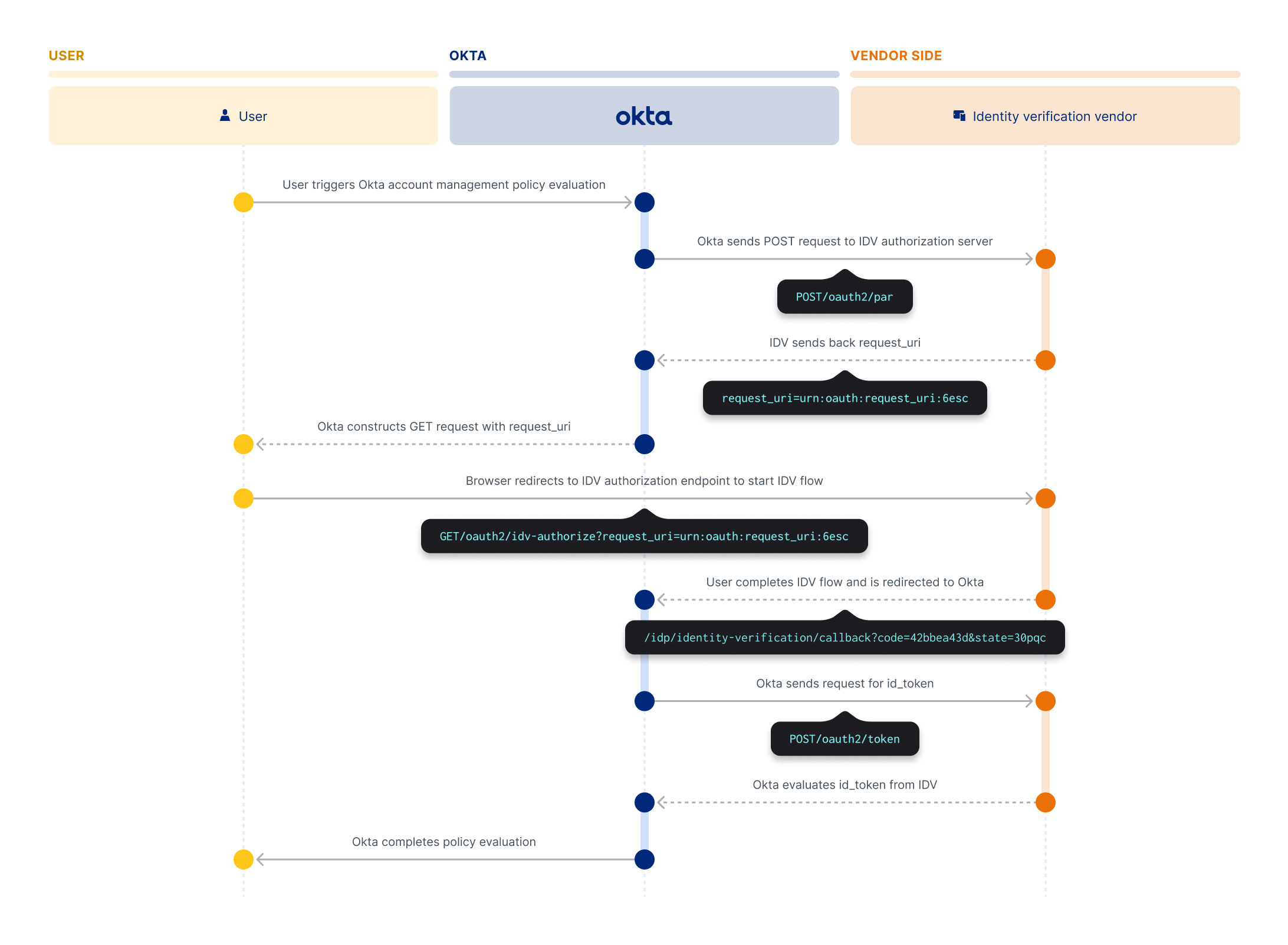
An Okta user does one of the following actions to trigger an Okta account management policy evaluation:
- Enrolls or unenrolls an authenticator
- Recovers their password
- Unlocks their account
Okta then sends a
POST /oauth2/parrequest to the IDV vendor's authorization server.The IDV vendor processes the request and sends a response to Okta with a
request_uri.Okta receives the
request_uriand uses it to construct aGET /oauth2/authorizerequest.Okta redirects the
request_urito the user's browser. The user's browser sends the GET request to the IDV vendor's authorization endpoint to start the IDV flow. The GET request contains therequest_uriparameter.The user then completes the IDV flow, and the IDV vendor creates an
authorization_codeand returns it to Okta in a response.Okta creates and sends a
POST /tokenrequest to the IDV vendor that contains information from the redirect response.The IDV vendor sends an ID token containing the results of the flow back to Okta.
Okta evaluates the results and completes the policy evaluation. The policy evaluation is marked as
VERIFIEDorFAILED.
Summary of steps
The following sections detail the steps of an IDV vendor integration.
Policy evaluation
A user triggers an Okta account management policy evaluation. There are several ways to trigger a policy evaluation:
- A user enrolls or unenrolls an authenticator
- A user recovers their password
- A user unlocks their account
POST /oauth2/par request to IDV vendor
After the user triggers a policy evaluation, Okta sends a POST /oauth2/par request to the IDV vendor's authorization server.
The request contains standard pushed authorization request (PAR) parameters (opens new window) and a verified_claims object. The verified_claims object contains two identity verification objects that determine how the IDV flow interacts with Okta.
- The
claimsobject passes the information about the Okta user to the IDV vendor. - The
verificationobject determines the trust framework between Okta and the IDV vendor and the necessary assurance level for a successful IDV flow.IDV-DELEGATEDis the only trust framework that Okta supports for IDV vendor integration.
When Okta sends the request, a unique verification session is established.
The following example shows a POST /oauth2/par request with the fuzzy extension enabled for all claims.
POST /oauth2/par request example
curl -L -X POST "https://idv-vendor.com/oauth2/par" \
  -H "Content-Type: application/x-www-form-urlencoded" \
  -d '{
  "response_type": "code",
  "client_id": "{client_id}",
  "client_secret": "{client_secret}",
  "code_challenge": "{code_challenge}",
  "code_challenge_method": "{code_challenge_method}",
  "scope": "openid profile identity_assurance idv_flow_{idv_flow_id}",
  "nonce": "{nonceValue}",
  "claims": {
    "id_token": {
      "verified_claims": [
        {
          "verification": {
            "trust_framework": {
              "value": "IDV-DELEGATED",
              "essential": true
            },
            "assurance_level": {
              "value": "VERIFIED",
              "essential": true
            }
          },
          "claims": {
            "given_name": {
              "value": "{ud_mapped_first_name}",
              "fuzzy": true
            },
            "family_name": {
              "value": "{ud_mapped_last_name}",
              "fuzzy": true
            },
            "middle_name": {
              "value": "{ud_mapped_middle_name}"
              "fuzzy": true
            },
            "email": {
              "value": "{ud_mapped_email}"
              "fuzzy": true
            },
            "bithdate": {
              "value": "{ud_mapped_birthdate}",
              "fuzzy": true
            },
            "phone_number": {
              "value": "{ud_mapped_phone_number}",
              "fuzzy": true
            },
            "address": {
              "street_address": {
                "value": "{ud_mapped_street_address}",
                "fuzzy": true
              },
              "locality": {
                "value": "{ud_mapped_city}",
                "fuzzy": true
              },
              "region": {
                "value": "{ud_mapped_state}",
                "fuzzy": true
              },
              "postal_code": {
                "value": "{ud_mapped_zipcode}",
                "fuzzy": true
              },
              "country": {
                "value": "{ud_mapped_country}",
                "fuzzy": true
              }
            }
          }
        }
      ]
    }
  },
  "state": "{external_state_token_id}",
  "login_hint": "{user_id}",
  "redirect_uri": "https://{yourOktadomain}/idp/identity-verification/callback"
}'
POST /oauth2/par error response
The error response for an unsuccessful POST /oauth2/par request uses this structure (opens new window).
 HTTP/1.1 400 Bad Request
 Content-Type: application/json
 Cache-Control: no-cache, no-store

 {
   "error": "invalid_request",
   "error_description":
     "The redirect_uri is not valid for the given client"
 }
Request parameters
| Parameter | Description | Param Type | DataType |
|---|---|---|---|
| response_type | Determines the type of flow. Okta uses code to identify the request as an authorization_code flow. | String | String |
| client_id | Unique identifier of the IDV vendor app. IDV vendors provide this value. | String | String |
| client_secret | A confidential key associated with the IDV vendor's client_id. IDV vendors provide this value. | String | String |
| code_challenge | A cryptographic string derived from a code verifier. It’s used with the Proof Key for Code Exchange (PKCE) mechanism. | String | String |
| code_challenge_method | The transformation method that’s used to create the code_challenge from the code verifier. Okta uses the S256 method. | String | String |
| scope | Defines the permissions or access levels that are requested. | String | String |
| openid | Identifies the request as an OpenID Connect (OIDC) request. | String | String |
| profile | Requests access to the end user's default profile claims. | String | String |
| identity_assurance | Requests access to the verified_claims object. | String | String |
| idv_flow_{idv_flow_id} | Identifies a specific IDV flow from the IDV vendor. Replace {idv_flow_id} with the identifier of the flow. You can leave it out of the request if the client_id and client_secret are configured to represent a specific flow from the IDV vendor. | String | String |
| verified_claims | Contains the verification and claims objects. | Object | Array |
| nonce | A unique, random string that’s used to associate a client session with an ID token. Okta generates this value. | String | String |
| verification | Specifies the parameters and requirements for verifying the claims. Okta uses both the trust_framework and assurance_level properties. See the OIDC definition of the verification (opens new window) property. | Object | Object |
| trust_framework | Identifies the trust framework that provides assurance about the verified attributes. Okta sets IDV_DELEGATED as the default value. This value delegates identity verification and the assurance policy to the IDV vendor. The IDV vendor is then responsible for verifying user identities and sends the results back to Okta. IDV_DELEGATED is currently the only supported trust framework. See the OIDC definition of the trust_framework (opens new window) property. | String | String |
| assurance_level | Identifies the assurance level that's required for the identity claims of the user. The IDV vendor must map their verification results to the possible assurance levels, VERIFIED or FAILED. For a successful verification, the IDV vendor must pass VERIFIED as the assurance_level. For a failed verification, the IDV vendor must pass FAILED or a null value. See the OIDC definition of the assurance_level (opens new window) property. | String | String |
| claims | Contains user-specific attributes. Okta supports these OIDC claims. For more information, see the OIDC definition of the claims (opens new window) property. | Object | Object |
| fuzzy | An extension that adds fuzzy logic to a specified claim to assist with matching the claim value. The fuzzy extension is set as true for all claims by default and can't be set to false. When the fuzzy extension is true, the value of the claim is treated as an attribute itself. | String | String |
| state | A unique string that maintains a connection between the request and the callback. | String | String |
| redirect_uri | The URI where the response is sent after the user completes the IDV flow. The redirect URI is the location where the custom IDV vendor sends the verification response. The URI sent in the verification request from the client needs to match the redirect URI set at the IDV vendor. This is the URL where the IdP returns the authentication response (the access token and the ID token). Ensure that the URI is located in a secure domain that you own. It's constructed using your Okta subdomain and then the callback endpoint. For example, if your Okta subdomain is called company, then the URL would be: https://company.okta.com/idp/identity-verification/callback If you’ve configured a custom domain in your Okta org, use that value to construct your redirect URI, such as https://login.company.com/idp/identity-verification/callback. | String | String |
| login_hint | Identifier that associates an Okta user within the IDV vendor's app. | String | String |
IDV vendor responds with request_uri
A successful POST /oauth2/par request generates a request_uri that's sent back to Okta as an HTTP 201 Created response. The request_uri encodes the identity verification attributes of the POST /oauth2/par request as a reference to the now established verification session. For information about the successful response structure, see the Successful Response (opens new window) from the IETF PAR specification.
A successful response uses the format outlined in the following example and must have the HTTP 201 Created status.
POST /oauth2/par response example
HTTP/1.1 201 Created
Content-Type: application/json
Cache-Control: no-cache, no-store

{
  "request_uri": "urn:ietf:params:oauth:request_uri:6esc_11ACC5bwc014ltc14eY22c",
  "expires_in": 60
}
Okta redirects GET /oauth2/authorize request to user
Okta uses the request_uri in the IDV vendor response and constructs a GET /oauth2/authorize request. Okta then redirects the request_uri, that now contains the GET /oauth2/authorize request, to the user's browser.
User's browser sends GET /oauth2/authorize request to IDV vendor
The user's browser sends the GET request to the IDV vendor's OAuth 2.0 authorization endpoint. The IDV vendor evaluates the request_uri so that the IDV flow can start.
Notes:
- For IDV vendors, Okta recommends renaming the authorization endpoint so that it's clear the endpoint is used for identity verification. For example, rename the endpoint to
/oauth2/idv-authorize.- IDV vendors must provide a user experience at their authorization endpoint that supports a user taking up to 10 minutes to complete the IDV flow.
GET /oauth2/authorize request example
curl -L -X GET "https://idv-vendor.com/oauth2/idv-authorize?request_uri=urn:ietf:params:oauth:request_uri:6esc_11ACC5bwc014ltc14eY22c"
GET /oauth2/authorize error response
The error response for an unsuccessful GET /oauth2/authorize request uses this structure (opens new window).
HTTP/1.1 302
GET /idp/identity-verification/callback?error=invalid_request&state=30pqcSFzH7H0bIftWwYRbNNwbpOpfY-W
User completes the IDV flow
The user is then redirected to the IDV vendor app to complete the IDV flow.
IDV vendor sends authorization_code to Okta
After the user completes the IDV flow, the IDV vendor redirects them to the redirect_uri specified in the POST /oauth2/par request. The user is redirected to their Okta org. The redirect_uri contains an authorization_code that’s redeemed at the /oauth2/token endpoint to retrieve the IDV flow results.
IDV vendor redirect to Okta example
curl -L -X GET "https://{yourOktadomain}/idp/identity-verification/callback?code=42bbe6319f0b04a43d&state=30pqcSFzH7H0bIftWwYRbNNwbpOpfY-W"
Okta sends a POST /token request to IDV vendor
Okta receives the authorization_code from the IDV vendor. Okta then uses it to construct and send a POST /token request to the IDV vendor. The request contains a code_verifier value that’s compared against the code_challenge value provided in the POST /oauth2/par request. The values must match for the POST /token request to succeed.
POST /token request example
curl -L -X POST "https://idv-vendor.com/token" \
  -H "Content-Type: application/x-www-form-urlencoded" \
  --data-urlencode "grant_type=authorization_code" \
  --data-urlencode "client_id={client_id}" \
  --data-urlencode "client_secret={client_secret}" \
  --data-urlencode "code=42bbe6319f0b04a43d" \
  --data-urlencode "code_verifier=72e0dca42dd87b345f0652899cba4f92e7b9bb2422f7c5a301ffae41" \
  --data-urlencode "redirect_uri=https://{yourOktadomain}/idp/identity-verification/callback"
POST /token error response
The error response for an unsuccessful POST /token request uses this structure (opens new window).
 HTTP/1.1 400 Bad Request
 Content-Type: application/json
 Cache-Control: no-cache, no-store

 {
   "error": "invalid_request",
   "error_description":
     "The request is missing a required parameter"
 }
IDV vendor responds with id_token
When the POST /token request succeeds, the IDV vendor sends an ID token in a JSON Web Token (JWT) encoded format back to Okta in response. IDV vendors must include the id_token JWT and the expires_in parameter in the POST /token response. The expires_in parameter indicates the lifetime in seconds of the id_token. See the example below.
How to structure the id_token response
IDV vendors must structure the parameters in the payload of the id_token JWT according to the structure in the example. For information about the structure of the id_token response, see ID Token (opens new window) from the OIDC specification.
Note the following the ways to format the claims object for the id_token response:
IDV vendors must not include any
claimsattributes other than the currently supported ones. Okta fails a policy evaluation that returnsclaimsattributes other than the supported ones.IDV vendors can choose to return a
MATCHEDvalue for anyclaimsattributes, instead of returning identifying information about a user. Returning aMATCHEDvalue still indicates that the verification was successful but doesn't require IDV vendors to pass identifying information of a user.IDV vendors can choose to not pass any
claimsvalues. They can passclaimsas an empty object. See Minimum conformant (opens new window).
Note: If an IDV vendor passes an empty
claimsobject, then theuser.identity_verificationevent marks all claims as verified or failed. Whether the claims are failed or verified depends on theassurance_levelvalue that's passed.
The id_token payload
The id_token payload includes the verified_claims object. This object contains the results of the identity verification for the user. Okta requires some parameters in the payload of the id_token JWT which are otherwise optional according to the OIDC specification. IDV vendors must include Required parameters in their id_token response. See the following table for a list of the required parameters in the ID token payload.
| Parameter | Description | Param Type | DataType | Required or optional |
|---|---|---|---|---|
| iss | The issuer identifier for the IDV vendor. This value must be a URL with a scheme of https. | String | String | Required |
| aud | The audience that the id_token is intended for. This value must be the client_id of the Okta app that's configured with the IDV vendor. | String | String | Required |
| sub | The subject identifier that's unique to the user. | String | String | Required |
| exp | The expiration time after which the id_token must not be accepted for processing. This value must be in the future. | Integer | Number | Required |
| iat | The time when the id_token was issued. This value must be in the past. | Integer | Number | Required |
| nonce | The unique, random string that was sent in the POST /oauth2/par request. | String | String | Required |
| verified_claims | Contains the results of the identity verification process. This array includes the verification and claims objects. | Object | Array | Required |
| verification (opens new window) | Contains information about the verification process. This object includes the trust_framework, assurance_level, time, and verification_process properties. | Object | Object | Required |
| trust_framework | Identifies the trust framework that was used for the identity verification. This value must be IDV-DELEGATED. | String | String | Required |
| assurance_level | Identifies the assurance level that was achieved for the identity claims of the user. This value must be either VERIFIED or FAILED. | String | String | Required |
| time | The time when the identity verification was completed. This value must be in ISO 8601 (opens new window) format. | String | String | Required |
| verification_process | Unique reference to the identity verification process. | String | String | Optional |
| claims | Contains the identity claims of the user. This object includes the OIDC claims that were requested in the POST /oauth2/par request. | Object | Object | Required |
| fuzzy | An extension that adds fuzzy logic to a specified claim to assist with matching the claim value. If a claim is passed in the PAR request with the fuzzy extension, then the fuzzy extension must be passed with that claim in the ID token response too. The fuzzy extension is set as true for all claims by default and can't be set to false. When the fuzzy extension is true, the value of the claim is treated as an attribute itself. | String | String | Required |
IDV vendor id_token response example in encoded JWT format
{
  "id_token": "eyJhbGciOiJSUzI1NiIs...",
  "token_type": "Bearer",
  "expires_in": 3600
}
Decoded IDV vendor id_token response example
{
  "iss": "https://idv-vendor.com",
  "aud": "0oaa7jqrhYIOAWsJ5a",
  "sub": "01oabcdefgklgjq",
  "exp": 1715034683,
  "iat": 1715031083,
  "nonce": "wc4IPgjuKWspqw-c",
  "verified_claims": [
    {
      "verification": {
        "assurance_level": "VERIFIED",
        "time": "2025-07-16T19:26:10",
        "trust_framework": "IDV-DELEGATED",
        "verification_process": "session-1234567890"
      },
      "claims": {
        "birthdate": {
          "fuzzy": true,
          "value": "2000-01-01"
        },
        "family_name": {
          "fuzzy": true,
          "value": "Jones"
        },
        "given_name": {
          "fuzzy": true,
          "value": "Patrick"
        },
        "phone_number": {
          "fuzzy": true,
          "value": "+15111111111"
        },
        "email": {
          "fuzzy": true,
          "value": "dan@example.com"
        },
        "address": {
          "street_address": {
            "fuzzy": true,
            "value": "123 Main St"
          },
          "locality": {
            "fuzzy": true,
            "value": "Austin"
          },
          "region": {
            "fuzzy": true,
            "value": "TX"
          },
          "postal_code": {
            "fuzzy": true,
            "value": "78701"
          },
          "country": {
            "fuzzy": true,
            "value": "US"
          }
      }
    }
  ]
}
Okta completes the policy evaluation
After the ID token is returned in the response from the POST /token request, Okta completes the policy evaluation.
Okta inspects id_token object. The policy evaluation is successful if the trust_framework and assurance_level values match the values that were passed in the POST /oauth2/par request, IDV-DELEGATED and VERIFIED.
If either of the trust_framework or assurance_level attributes aren't included in the id_token response or if they have null or unexpected values, then Okta marks the policy evaluation as unsuccessful.
Failed policy evaluation example
For example, a user completes an IDV flow but provides a name that doesn't match the given_name value. The assurance_level value is sent back as FAILED in the id_token response. And the given_name value is returned as null.
{
  "iss": "https://idv-vendor.com",
  "aud": "0oaa7jqrhYIOAWsJ5a",
  "sub": "01oabcdefgklgjq",
  "exp": 1715034683,
  "iat": 1715031083,
  "nonce": "wc4IPgjuKWspqw-c",
  "verified_claims": [
    {
      "verification": {
        "assurance_level": "FAILED",
        "time": "2024-10-07T10:00:00Z",
        "trust_framework": "IDV-DELEGATED"
      },
      "claims": {
        "given_name": {
          "fuzzy": true,
          "value": null
        },
        "family_name": {
          "fuzzy": true,
          "value": "Jones"
        }
      }
    }
  ]
}
Identity verification events
There are two events related to identity verification: user.identity_verification and user.identity_verification.start. Okta admins can view these events in the System Log. See Event Types.
user.identity_verification.start: This event is triggered when an Okta account management policy prompts a user to verify their identity with an IDV vendor.user.identity_verification: This event is triggered after Okta completes the evaluation of an Okta account management policy.
For the user.identity_verification event, there are two possible results for the event: ALLOW (user is successfully verified) or DENY (user isn't verified).
The ALLOW result provides a CLAIMS_VERIFIED reason that indicates the IDV vendor successfully verified the user.
There are multiple possible reasons for the DENY result. See the following table.
| Error reason | Description |
|---|---|
PARSING_ERROR | Indicates that Okta wasn't able to parse the response from the IDV vendor because of invalid or malformed data. There are multiple versions of this error that relate to the specific parsing issue encountered. For example, you can see PARSING_ERROR_GIVENNAME or PARSING_ERROR_FAMILYNAME if there's a parsing issue with those parameters. |
MISSING | Indicates that a required parameter or value wasn't present in the request or response. There are multiple versions of this error that relate to the specific issue encountered. For example, you can see MISSING_GIVENNAME or MISSING_FAMILYNAME if those parameters aren't included. |
RESPONSE_PROCESSING_ERROR | Indicates that Okta encountered an error while processing the response from the IDV vendor. There are multiple versions of this error that relate to the specific issue encountered. For example, you can see RESPONSE_PROCESSING_ERROR_PAR if there's an issue with the PAR request. |
ERROR_RESPONSE | Indicates that the IDV vendor returned an explicit error response to Okta. There are multiple versions of this error that relate to the specific issue encountered. For example, you can see ERROR_RESPONSE_TOKEN if the token that's provided is invalid. |
EMPTY_USER_ID | Indicates that no user ID was provided in the request to the IDV vendor. |
MISSING_CODE_CHALLENGE | Indicates that the code challenge required for PKCE was missing from the request. |
MISSING_APP_INSTANCE | Indicates that the application instance required for the IDV flow wasn't found or wasn't provided. |
MISSING_AUTH_STATE_TOKEN | Indicates that the authentication state token required for the flow was missing or invalid. |
CLAIMS_NOT_VERIFIED | Indicates that the IDV vendor has assessed that not all claims attributes were verified. |
CLAIM_GIVEN_NAME_NOT_VERIFIED | Indicates that the given_name value wasn't verified. |
CLAIM_FAMILY_NAME_NOT_VERIFIED | Indicates that the family_name value wasn't verified. |
Use the System Log to track identity verification events
Along with the IDV events (user.identity_verification.start and user.identity_verification), there are two properties that are attached to those events. The properties are also attached to the policy.evaluate_sign_on event when an Okta account management policy is involved.
IdvReferenceId: This property provides a reference ID that's attached to all the relevant events of an IDV process.IdvFlowId: This property displays the ID of the IDV flow. Admins can use this property to more easily track information related to a specific IDV flow.
Supported OIDC claims
Okta supports the following OIDC claims. IDV vendors can choose among any of these claims and use them in their IDV flow.
Note: IDV vendors must always include the
given_nameandfamily_nameclaims.
| Supported claim | Description | DataType |
|---|---|---|
| given_name | The user's first name. | String |
| family_name | The user's last name or surname. | String |
| middle_name | The user's middle name. | String |
| The user's email address. | String | |
| birthdate | The user's date of birth. Format the date of birth in the ISO 8601 format (YYYY-MM-DD). | datetime |
| phone_number | The user's phone number. Format the phone number in the E.164 format | String |
| street_address | The user's street address. This claim can include new lines. | String |
| locality | The user's city or locality. | String |
| region | The user's state, province, prefecture, or region. | String |
| postal_code | The user's postal or ZIP code. | String |
| country | The user's country. Format this value with the country name. | String |
Map Okta user profile attributes to OIDC claims
Okta admins can map any of these supported claims to user profile attributes. See Map profile attributes from Okta to the IDV vendor IdP (opens new window).
Admins can set user profile attributes as required when they map them to to the corresponding IDV vendor attribute. The given_name and family_name claims are required by default. When a PAR request is sent from Okta, and a required claim doesn't have a value in the user's profile, then the initial PAR request fails.
However, if a claim is mapped but not set as required, and it doesn't have a value in the user's profile, then the claim is excluded from the initial PAR request. The PAR request isn't failed.
