
On this page
Sign-up flows
Before you configure your sign-up flow in Okta, use these questions to define your onboarding strategy. Following these recommended paths ensures a balance between user experience and security while maintaining scale and velocity.
Entry points and account types
Different users, such as customers, partners, and contractors, often require different registration logic:
- The question: Where do users find the sign-up link, and does the entry point change based on their user type? Is the audience general (public self-service) or known (invitation-only)?
- The recommended path: Use context-aware routing. For multiple user types, use a centralized "chooser" page or subdomains (for example,
partners.example.com). Route each group to an Okta Profile Enrollment Policy tailored for that user type.
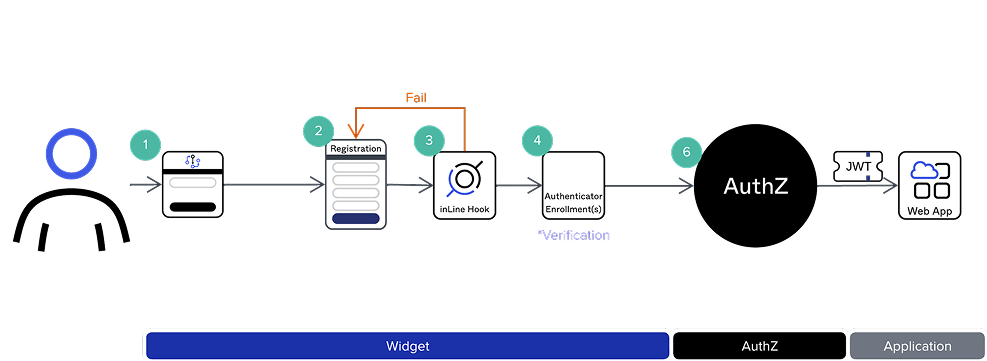
The following diagram shows a sign-up flow that originates from the Okta-hosted Sign-In Widget:
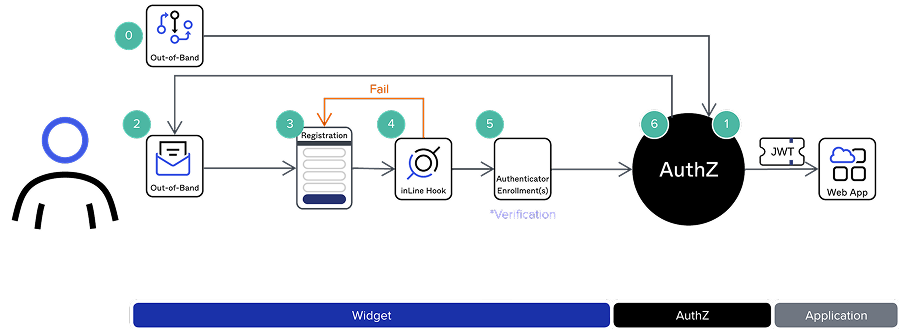
The following diagram shows an out-of-band sign-up flow, where registration is initiated through an external channel such as an email invitation sent to an employee or customer:
Friction vs. security
Every registration step is a potential drop-off point. Decide where to place the onus on the user:
- The question: Which authenticators that users must enroll in when they sign up, and what level of assurance is required to ensure that these are real accounts?
- The recommended path: Implement progressive enrollment. For the best user experience (UX), require only a password and email verification during initial registration. Prompt for stronger factors, such as Okta Verify or WebAuthn, only when the user attempts to access sensitive resources.
- Toll Fraud Mitigation: To reduce noise and avoid erroneous fees (including SMS toll fraud), implement bot detection like reCAPTCHA or strict Rate Limiting during the initial sign-up.
Profile completion
Gathering data is essential for segmentation, but long forms deter users:
- The question: What specific attributes (for example, fob title, org ID) must the user provide immediately?
- The recommended path: Use Required Attributes sparingly. Limit the registration form to 3-5 essential fields. Use Okta’s Profile Enrollment to make these fields mandatory. To enrich profile data further, use Okta Inline Hooks. These pull information from external databases at registration time without adding friction for the user.
Modern authentication (OAMP & passwordless)
Modernize the flow by promoting friction-free authentication methods:
- The question: How can you move away from traditional passwords to improve security and UX?
- The recommended path: Promote Passwordless and Passkeys early in the flow. By using the Okta Authentication Policy (OAMP), you can allow users to sign up using biometric factors or email magic links. This significantly reduces the risk of credential-based attacks while speeding up the sign-in process.
Group assignment and automation
Automating permissions ensures that users have immediate access without manual admin intervention:
- The question: How should you assign groups and handle specific MFA requirements?
- The recommended path: Use a Role-Based Access Control (RBAC) approach:
- Assign with a policy: Use the Profile Enrollment Policy to automatically add all new registrants to a New Users group.
- Automate with rules: Use Group Rules to move users into functional groups (for example,
MFA_Required) based on attributes provided during the sign-up process. - Opt-in flow: If MFA is optional, map a Use_2FA checkbox to a custom boolean attribute. A group rule can then automatically add the user to a group targeted by a specific MFA policy.
Branding and aesthetics
A visual disconnect between your app and the registration form can reduce user trust:
- The question: How should you apply your brand’s look and feel to the form?
- The recommended path: Use the Okta Hosted Sign-In Widget. It's the most secure way to maintain consistency. Use the Okta Branding Tool (or custom CSS) to match your company’s colors and logos, providing a seamless transition from your app to the sign-in flow.
The end-to-end UX and communication
The registration flow doesn't end when the user clicks Submit:
- The question: Is email verification required, and what do your automated communications say?
- The recommended path:
- Verification: Always require email verification to prevent spam accounts.
- Success landing page: Upon successful registration, redirect users to a specific "Welcome" or "Getting Started" dashboard rather than just the generic sign-in page.
- Branded prompts: Ensure SMS and email prompts are concise and branded. Match the From address and Display Name to your app name to prevent users from flagging messages as phishing.
