
On this page
Multibrand architecture
If you're responsible for multiple brands, there are a few key concepts you should know. Setting up your brand architecture means understanding your options and how they fit together.
Note: This document applies to the customization of Gen3 of the Sign-In Widget. For information about Gen2, see the Style the sign-in page guide.
Multibrand context controls
Context controls help you decide which branding an end user should see during sign-in. They work as signals that Okta or your app can use to pick the right look and feel for each user.
Okta context
Okta context controls often use fixed attributes of the environment or identity models:
- Fixed Controls: The org and domain are fixed properties of the Okta environment. They establish a baseline context, often tied to data residency or initial federation models. See No SSO required.
- Code-Based Context: Attributes like the unique app ID or app label are provided by Okta. Client-side code (such as JavaScript) reads these at page load to trigger a brand switch. See High complexity and Fewer than five brands.
External Context
External context controls are managed and supplied by the originating app or the user's local environment before or during the request to Okta. They’re typically implemented through custom code:
- Client-Side Storage: Using a cookie or local storage allows the origin app to store a branding preference locally. However, this method is transient and subject to browser restrictions. Client-side storage isn't consistent across devices or browsers.
- URL Parameters: Appending data to the URL with a QueryString is another code-based approach. You can use federation-compliant fields like
stateornonceto safely transfer the desired context or branding flag.
See Context controls reference for a full list of available controls.
Domain strategy decision flow
The right multibrand architecture requires that you answer the following questions:
- Do you need Single Sign-On (SSO) authentication?
- How complex are your brand's visual needs?
The following diagram shows the decision flow that you should follow when setting up your architectural approach:
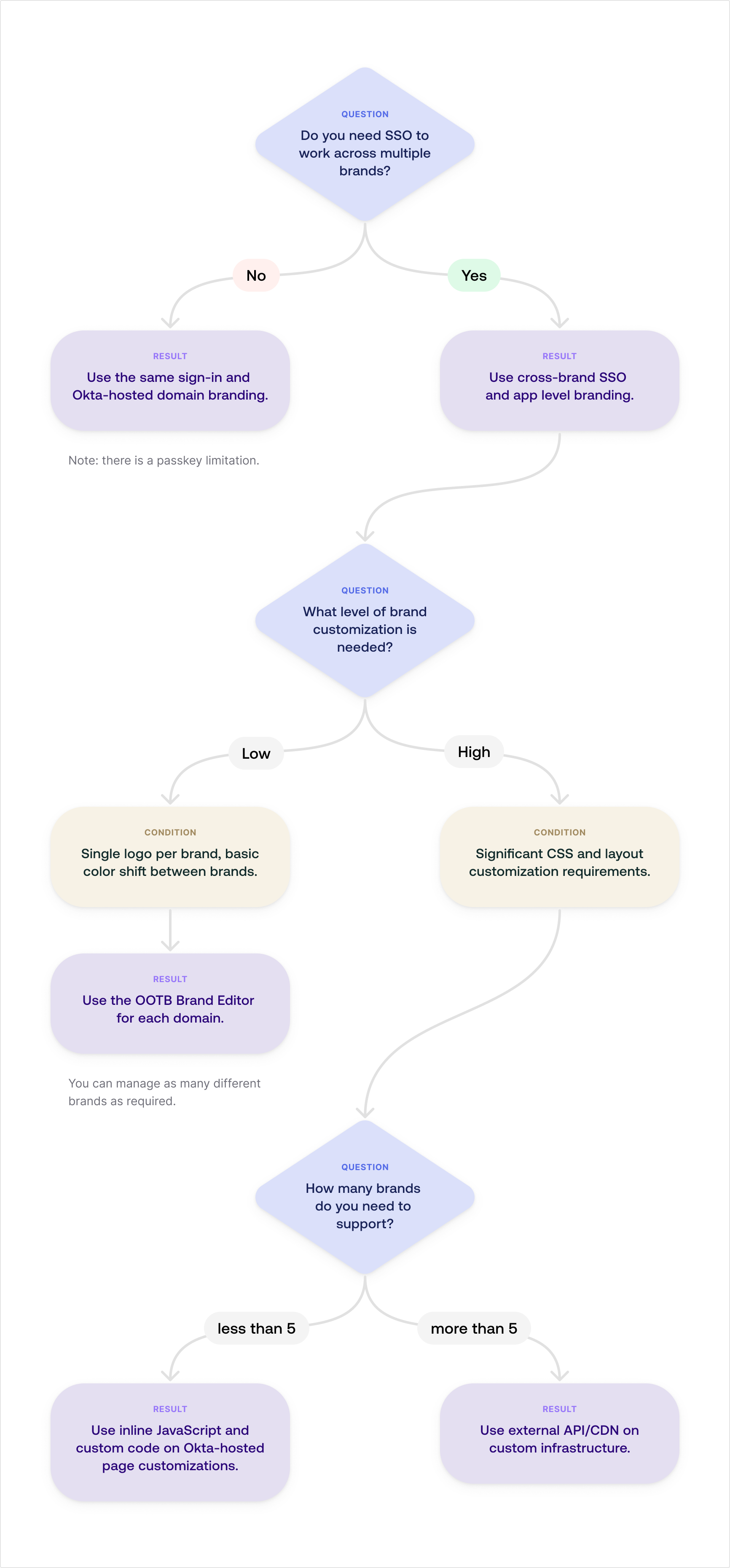
SSO requirements across brands
The first architectural decision determines whether you need to use domain-level or app-level branding.
No SSO required
Your brands operate independently and don’t require end users to sign in once to access all brand-specific apps. In that case, you can use domain-level branding within a single Okta org.
In this scenario, all brands share an underlying Okta sign-in experience (that is, a single Okta domain), and customizations are applied at the domain level.
This approach simplifies management by centralizing user identity and policy enforcement. However, the degree of visual customization across brands is limited to what the core Okta Sign-In Widget allows.
End users have a “same sign-in experience", and can have the same username, password, email, phone, and even one-time passcodes (OTPs).
See About Okta domain customization.
Note: If you plan to use passkeys, this approach limits you to five associated domains.
SSO required
If users need a seamless experience—signing in once and gaining access to multiple distinct brands—you must implement cross-brand SSO. Cross-brand SSO requires app-level branding.
In this model, you apply customization at the app level (clientId) rather than to the entire Okta domain. The common sign-in session enables SSO across all configured apps. It doesn't matter how you brand each app.
Assess brand complexity
If you choose Cross-Brand SSO, the next step is to evaluate the visual complexity of your multibrand ecosystem.
Low complexity
Low complexity applies when branding requirements are basic and involve minimal code modification. For example, a single logo per brand, basic color shifts, and standard layout reuse.
You can often handle the branding using built-in theme editors, profile customizations, or minimal configuration within the app itself.
This approach is highly scalable and can theoretically support an infinite number of different brands. The complexity overhead remains low for each addition.
Using the function OktaUtil.getRequestContext(); returns an object like the following example:
app:{
  type: "object"
  value:{
    id: "0oa1wzp8ilsi2M9pk1d8"
    label: "Blue Application|brand_xyz"
    name: "oidc_client"
Use the pipe character (|) as a delimiter to parse the label string. This retrieves the second value, such as "brand_xyz", which you can use to select the appropriate look and feel.
High complexity
High complexity applies when your brands are visually diverse and need extensive code customization. The following are examples of complex branding:
- Significant custom CSS
- Unique layout requirements
- Complex responsive design rules
- Customized user flows that go beyond basic widget configuration
Number of brands
If your brand customizations are complex, the next step is to assess the number of brands you want to include in your architecture.
Fewer than five brands
If you have a small, manageable number of highly customized brands (fewer than five), you can use internal, inline code for implementation.
The branding logic resides directly within the Okta Sign-In Widget's customizable code blocks.
A JavaScript switch statement, or a series of if/else checks within the sign-in code, determines the active brand. The active brand is based on the unique app ID (app ID or client ID) passed to the Sign-In Widget. Inject the corresponding custom CSS or HTML inline.
The following example shows how to use app ID as a control:
//console.log(oktaData);
function getApp() {
    if (!OktaUtil) return undefined;

    var requestContext = OktaUtil.getRequestContext();
    if (requestContext && requestContext.app && requestContext.app.value) {
        return requestContext.app.value;
    }else{
        return "unknown"
    }
}
See Okta context (responsible party).
Five brands or more
If you have a large and growing number of highly customized brands, externalize your branding resources. It’s essential for performance, maintainability, and scalability.
Use a JavaScript snippet within the Okta widget to pass the appId (clientId) to an external API or Content Delivery Network (CDN) service. This service is responsible for determining the specific brand and swapping out the necessary assets (for example, load tokens, layout definitions, CSS) dynamically. This keeps the Okta-hosted code clean and separates brand-specific assets into a scalable, dedicated service. See Okta context (responsible party).
The following example shows how an external service can respond to a clientId lookup. That is, you need to perform this API call before you render the Sign-In Widget or sign-in page. The call returns all necessary branding tokens and resources needed to customize the Okta sign-in experience:
GET /api/public/clientid2brand/{clientId}

HTTP 200 application/json
{
  "type": "object",
  "properties": {
    "data": {
      "type": "object",
      "properties": {
        "name": {
          "type": "string"
        },
        "help_url": {
          "type": "string"
        },
        "logo": {
          "type": "string"
        },
        "design_tokens": {
          "type": "string"
        },
        "additional_css": {
          "type": "string"
        },
        "additional_html": {
          "type": "string"
        },
        "showWorkforceIdp": {
          "type": "boolean",
          "description": "Toggle on workforce identity provider option"
        }
      }
    }
  }
}
Common multibrand use cases
This section details common branding requirements and the recommended controls for implementing them within a multi-brand architecture. These patterns use the controls discussed in Context controls reference.
Brand families (product lines)
For bigger deployments, you might group a bunch of apps (like a product line or SKU) into a single brand family. This way, all the apps in that family share a similar look and feel.
Since consuming users or customers could have access across different product lines, a domain-centric approach is often not sufficient. It could break your SSO authentication flow.
Consider the following controls:
App label: Parse a custom string within the label. Optimal for dynamic and managed branding. You can easily manage the label within Okta. You can also carry branding metadata parsed by the client app.
App ID: Use with an external lookup service. Supports the greatest variation. Useful when a brand requires significant customization or when a single app is used by multiple brands. The ID serves as a key for a service that retrieves the specific brand assets.
See Okta context (responsible party).
Market-aware branding (regional or regulatory requirements)
Some brand requirements extend beyond standard app and domain boundaries, often intersecting with localization, data residency, or regional regulatory frameworks.
In these situations, you can’t rely on someone’s browser language or where they’re signing in from. Sometimes, you run into rules that need special regional authenticators or Identity Providers (IdPs) for a market like APAC. But those rules might not matter for everyone else.
Consider the following controls:
- App label: Parse a custom string within the label. Optimal for dynamic and managed branding. Similar to brand families, this control allows you to inject regional or regulatory metadata to adjust the experience.
- App ID: Use with an external lookup service. Supports the greatest variation. Best for when a market requires unique, app-wide brand and experience changes that need a high degree of variation.
- Domain: Carries branding across the entire experience. Use this control if a specific domain is synonymous with a specific market or brand.
Caution: If apps are shared across markets, the use of a different domain per market breaks SSO, and forces users to reauthenticate when transitioning between brands.
Context controls reference
Okta provides many different controls that you can use to set up multiple brands in your environment.
Okta context (responsible party)
The following table lists the controls that Okta is responsible for:
| Control | Type | Description |
|---|---|---|
| Tenant (Org) | Fixed (origin) | Okta default/built-in. The origin app determines the binding based on the federation model. Note: Tenant control could be necessary for data residency (for example, GDPR). |
| Domain | Fixed (origin) | Okta default/out-of-the-box admin control. The origin app determines the binding based on the federation model. |
| App ID | Code-based + context | Okta provides the unique app ID (app.value.id). Use client-side code (JS/HTML) at page load to switch branding. Function: OktaUtil.getRequestContext(). |
| App label | Code-based + context | Okta provides the unique app label (app.value.label). Use client-side code (JS/HTML) on the page load to parse the label and switch branding. Function: OktaUtil.getRequestContext(). |
| Browser telemetry | Code-based + browser agent | The browser provides language settings (navigator.language or navigator.languages). Use client-side code (JS/HTML) at page load to switch branding. |
| Self-declaration | Code-based + end user/local | Prompt the end user to select preferences and store the selection in a cookie or local storage. Warning: Doesn't persist across different browser sessions. |
External context (responsible party)
The following table lists controls that you control externally:
| Control | Type | Description |
|---|---|---|
| Cookie or local storage | Origin app + code-based | Store the branding selection in a cookie or local storage before going to the Okta Identity Provider. Warning: Doesn't persist across sessions and has domain/HTTP restrictions. |
| QueryString | Origin app + code-based | A custom implementation can append parameters to the URL to invoke the branding logic. Warning: Parameters could conflict or be dropped if they're outside federation specifications. You could use state or nonce to transfer context. |
Multi-org or multi-tenant solutions and multiple brands
The use of separate Okta orgs or tenants solely for branding or market segmentation isn’t recommended for the following reasons:
- Breaks SSO: Users must reauthenticate when moving between apps hosted on different orgs.
- Forces Directory Segmentation: Multi-org solutions create multiple separate user directories, which increases management overhead.
- Splits the user population: User data is segmented across tenants, and complicates global reporting and user management.
Note: There’s an exception: only use a multi-org/multi-tenant solution when data residency requirements explicitly mandate keeping user data physically separated by region or market.
