
On this page
Manage Okta APIs with the Okta Open Source MCP Server
The Okta Open Source Model Context Protocol (MCP) server securely connects AI agents and Large Language Models (LLMs) to an Okta org. This abstraction layer enables AI agents and LLMs to interact with Okta admin management APIs using natural language commands.
The Okta Open Source MCP Server translates natural language instructions into structured API calls between LLM clients and an Okta org using Okta's Python SDK v3.4.1. This approach reduces security risks and complexity when connecting autonomous AI agents to IAM systems. The architecture ensures that AI actions remain secure, properly scoped, and fully auditable.
IT admins, developers, and security professionals use the Okta Open Source MCP Server to automate Okta admin tasks through AI-powered interfaces.
Okta offers two ways to deploy an MCP server: the Okta Open Source MCP Server and the Okta Managed MCP Server. See Okta Open Source MCP Server overview to compare the two hosting options and choose the one that fits your environment.
Benefits
The Okta Open Source MCP Server addresses security, automation, and integration requirements.
- Security features: The Okta Open Source MCP Server reduces risks by acting as a security checkpoint for AI-initiated actions.
- Access control: The server enforces the principle of least privilege through scope-based tool loading and pre-defined tool definitions.
- Compliance: The system provides audit trails for compliance and security monitoring.
- Operational efficiency: Admins execute identity operations, such as security playbooks and repetitive tasks, with natural language commands.
- Standardized communication: The server uses a standardized protocol to eliminate the need for custom middleware or integration code.
Note: For a list of operations and tools, refer to the okta-mcp-server (opens new window) repo.
Secure AI agent interactions
The Okta Open Source MCP Server implements AI agent identity security through the following methods:
Principle of least privilege
The Okta Open Source MCP Server ensures that AI agents possess only the minimum permissions required for specific tasks.
- The server manages authentication through OAuth 2.0 scopes and environment variables.
- The server dynamically registers tools based on the granted API scopes of the Okta admin app, ensuring the LLM only sees authorized capabilities.
- The system blocks unauthorized API calls before those calls reach the org.
Audibility and traceability
The Okta Open Source MCP Server maintains a detailed record of all AI agent interactions to support security monitoring.
- The server creates a complete audit trail of all AI agent activities.
- The system integrates with Okta System Logs for centralized monitoring and security investigations.
- The server provides data to support compliance requirements and internal security audits.
How the Okta Open Source MCP Server works
The following process describes how an LLM translates a request and how the Okta Open Source MCP Server executes the API call against Okta APIs.
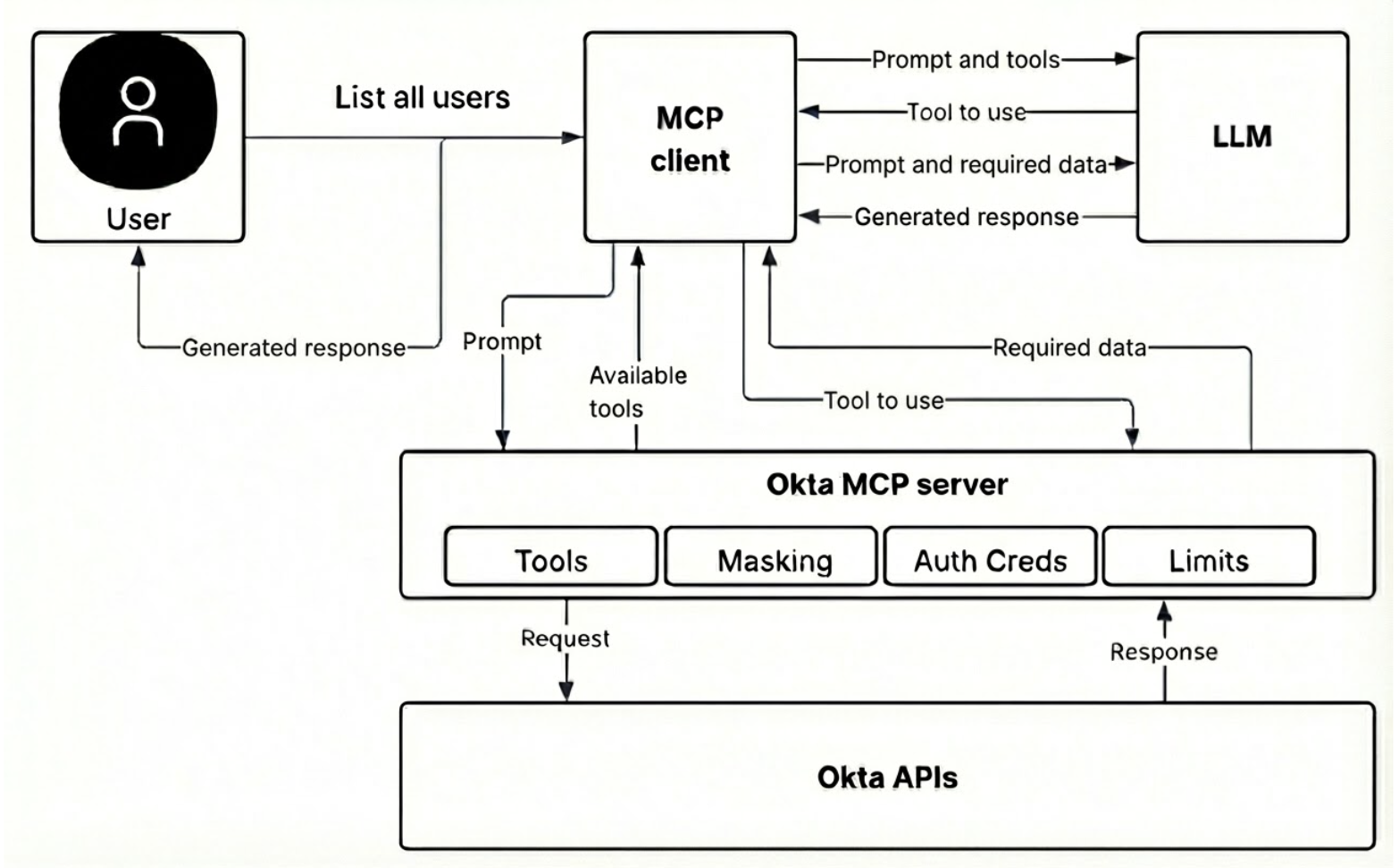
- User command: A user or AI agent (such as GitHub Copilot or Claude Desktop) sends a natural language command through an MCP-compatible client to perform an Okta task.
- Client routing: The MCP client (which hosts the AI agent) securely routes the command to the active Okta Open Source MCP Server instance.
- Server authentication: The Okta Open Source MCP Server authenticates with the org using the pre-configured credentials, such as Device Authorization Grant or Private Key JWT.
- Scope validation: The Okta Open Source MCP Server validates scope twice. First, it filters tools during sign in. Second, it uses a scope guard decorator to confirm active permissions immediately before executing a command and calling the API.
- Response handling: The APIs return a technical response to the Okta Open Source MCP Server.
- Natural language response: The Okta Open Source MCP Server passes the data to the LLM, which formats the information into a natural language response for the user.
Core functionality and capabilities
The Okta Open Source MCP Server enables AI agents to perform the following actions through natural language.
| Category | Example operations |
|---|---|
| User management | Create, list, retrieve, update, deactivate, delete users, and manage user profile attributes. |
| Group administration | Create, list, retrieve, update, and delete groups. Add and remove users from groups, and view group memberships. |
| App management | List, retrieve, create, update, activate, and deactivate apps. View app assignments. |
| Policy and security management | Manage authentication policies, password rules, MFA configurations, and device assurance policies. |
| System monitoring and logs | Filter System Logs, generate security audit reports, and query-specific sign-in failures. |
| Brands and customization | Manage brands, themes, custom pages, email templates, and custom domains. |
Security and authentication
The Okta Open Source MCP Server supports two authentications flows for different use cases:
OAuth 2.0 Device Authorization Grant (browser-based)
This browser-based flow is recommended for interactive use and local development. The Okta Open Source MCP Server initiates a flow where the user signs in through a browser. Upon successful authentication, the Okta Open Source MCP Server exchanges the authorization for a secure access token.
Private Key JWT (browserless)
This browserless flow is recommended for automation, CI/CD pipelines, and headless environments. The Okta Open Source MCP Server authenticates using a cryptographic key pair, which enables authentication without user intervention.
Next steps
To connect an LLM to an org, follow the Okta Open Source MCP Server implementation guide for setup instructions.
