
On this page
Rate limits overview
Rate limits are essential for maintaining both service continuity and effective security control. By acting as guardrails, rate limiting ensures that systems remain stable and protected against sudden traffic spikes or malicious attacks.
Fundamentally, rate limits define how many requests can be made to an endpoint within a specific time window. They help protect platform reliability and performance by preventing excessive traffic that could degrade service or introduce security risks like DDoS attacks. Rate limits also promote fairness by ensuring all users have equitable access to the service.
Okta implements rate limits using buckets. A rate limiting bucket is a collection of one or more endpoints that share a defined quota of calls per unit of time. A set of clients associated with the bucket consumes this quota.—this association is known as the scope of the bucket. The most general scope for a bucket is the entire org. Every client in the org that uses the associated APIs shares this bucket. Other, more specific buckets can be nested beneath a broader bucket and may be applicable to a subset of APIs for a subset of clients.
For example, there may be a bucket for /oauth2/v1/authorize with a quota of 1200 requests per minute for the entire org. Nested beneath it, there could be a bucket for /oauth2/v1/authorize with a quota of 600 requests per minute assigned to a specific client app APP_123. When APP_123 calls /oauth2/v1/authorize, the remaining quota status is 1,199 for that minute for the org, and 599 remaining for APP_123.
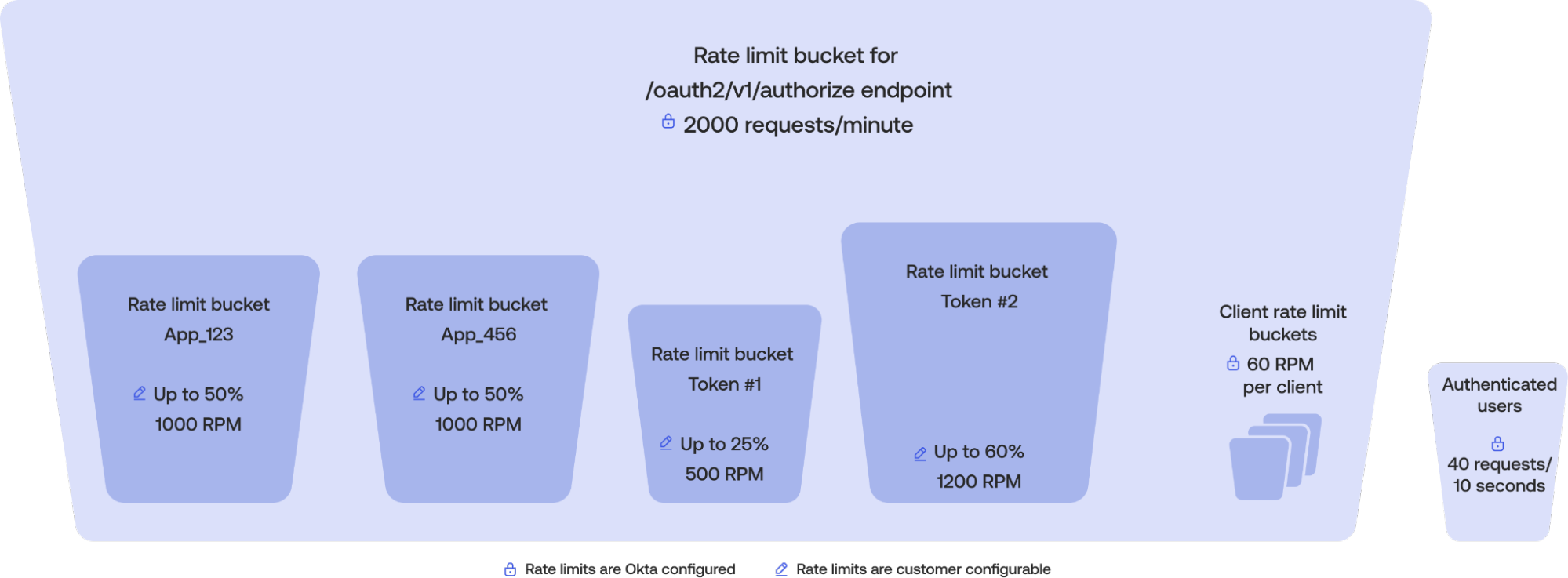
There are two other types of scopes that can apply to a bucket:
Authenticated users: Applies to users acting on the Admin or End-User Dashboard, and aren’t nested under any other bucket
Non-authenticated users: Applies to endpoints that take a username and password, and are always nested under a bucket
Buckets scoped to authenticated users are independent and not nested under any other bucket. That is, requests made by authenticated users to APIs covered by these buckets don't count under any other bucket. For example, there exists a bucket with org-wide scope for /api/v1/users/* with a quota of 1000 requests per minute and a separate bucket for /api/v1/users/me scoped to authenticated users with a quota of 40 requests per 10 seconds. A request to /api/v1/users/me by an authenticated user would decrement the authenticated user bucket to 39 remaining calls, while leaving the /api/v1/users/* bucket untouched. This ensures that authenticated users are able to call these APIs regardless of activity by other clients.
A bucket’s quota can vary based on several factors, including—but not limited to—the type of service subscription (for example, Workforce versus Customer Identity), the HTTP method used (for example, GET versus POST), the number of licenses purchased, and any applicable add-ons, such as DynamicScale. If the quota is exceeded within the time window, further requests are rejected with an HTTP 429 Too Many Requests response until the quota resets. You can monitor rate limit usage through the rate limit dashboard, System Log, or by inspecting the rate limiting headers included in API responses. See Monitor and troubleshoot rate limits.
Note: The following public metadata endpoints aren't subject to rate limits:
/oauth2/v1/keys/.well-known/openid-configuration/.well-known/oauth-authorization-server
How rate limiting works
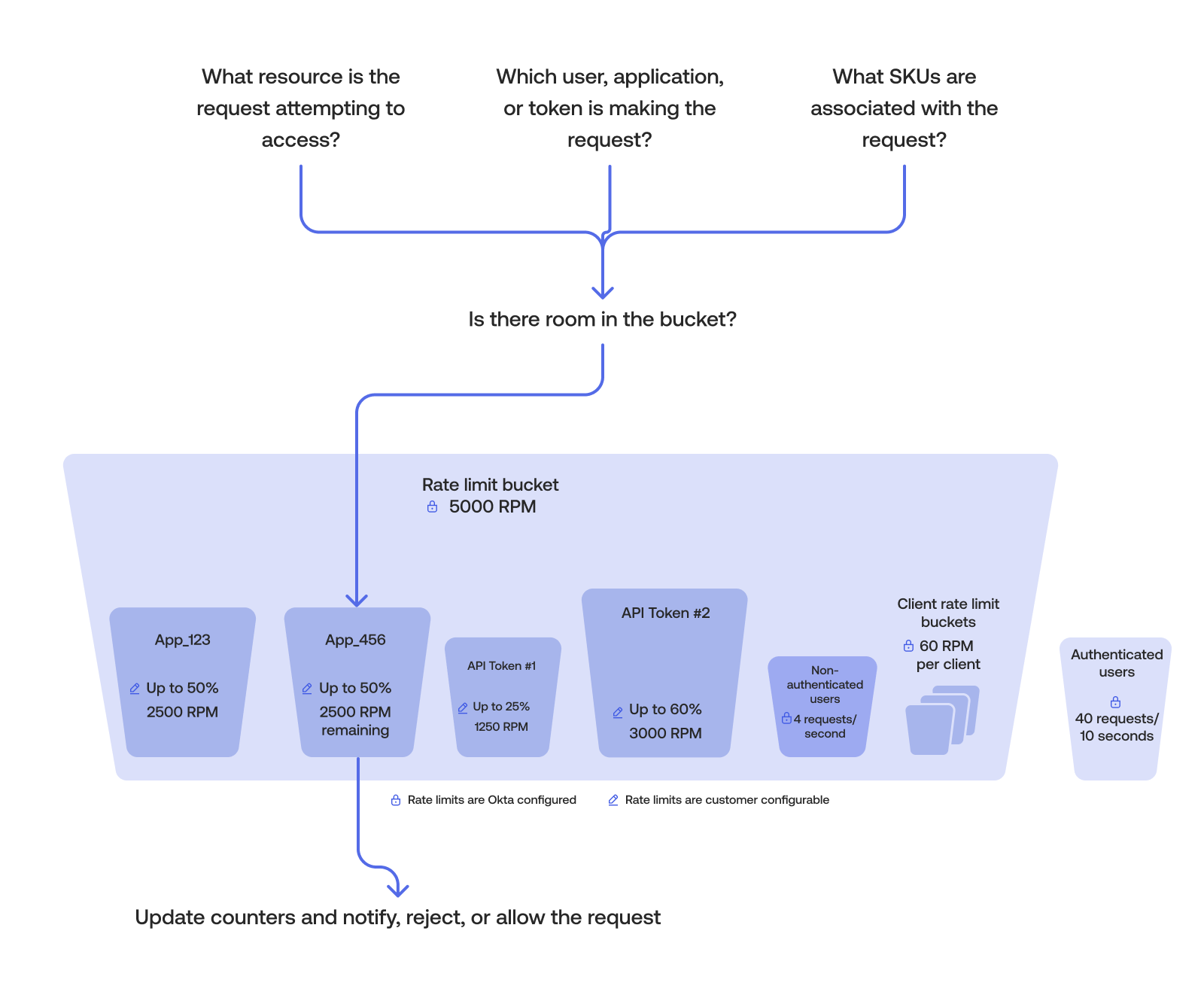
The logic behind the Okta implementation of rate limits can be summarized in the following steps:
- Okta identifies the resource that the request is attempting to access.
- Okta determines the identity and appropriate scope of the request. Is it a user, app, or token making the request?
- Determines what features are associated with the request (for example, does the requestor have DynamicScale or are they part of an Integrator Free Plan org?)
- Matches the request against the configured rate limit bucket or buckets.
- The request updates the counters, is either allowed or rejected, and triggers notifications if required. Most counters allow N requests per minute. Counters typically reset every 60 seconds, though they aren’t necessarily synchronized with wall clock minutes (for example, a period may run from
12:00:20to12:01:19).
Match requests
When a request is made, Okta’s algorithm attempts to match the HTTP method (GET, POST, and so on) request with a configured rate limit bucket. The most specific configuration always wins. There are two commonly used matches:
Exact match: The endpoint requested matches exactly to the configured rate limit bucket. The matching algorithm processes all exact match endpoints first.
Longest Match: If no exact match is found, the endpoint requested matches the prefix URL of one or more configured rate limit buckets. In this case, the Longest Match is used.
For example, consider the following two buckets:
/oauth2/{authorizationServerId}/v1/authorizefor Exact Match type for all HTTP operations/oauth2/{authorizationServerID}/v1/*for Longest Match type for all HTTP operations.
After a request has been matched, the counters for the impacted buckets are updated. If the counter nears the quota for that bucket, a warning event is generated in the System Log and an email notification is sent to super admins. Okta allows you to configure this warning threshold in the Admin Dashboard > Reports > Rate Limits > Settings section. If the counter exceeds the bucket's quota, then a violation event is written to the System Log and an email notification is also sent. Additional requests are rejected with an HTTP 429 Too Many Requests response until the counter resets.
Note: Okta always generates a System Log event for rate limit bursts, warnings, and violation events. Okta sends warning notification emails once per day and per hour for violation events. These emails only apply to org-scoped buckets.
