
On this page
Set up AI agent token exchange
Learn how to configure token exchange for AI agents so you can securely request and use credentials (ID-JAG, secrets, or service accounts) to access protected resources on behalf of authenticated users.
Note: Early Access Okta for AI Agents is in Early Access.
Learning outcomes
- Understand how to set up the token exchange flow for an AI Agent.
What you need
- Okta Integrator Free Plan org (opens new window)
- An Okta user account with the super admin role.
- Register an AI agent (opens new window) in your Okta org.
- Managed Connections is configured for the AI agent, defining which resources it’s allowed to access. See Secure an AI agent (opens new window).
- An OIDC web app is configured to authenticate users and obtain an ID token.
Overview
You have registered an AI agent (opens new window). You have also defined it's access to third-party resources integrated with your Okta org using Managed Connections. Now, the agent must obtain the actual tokens or credentials to perform tasks.
You can connect an AI agent (opens new window) to the following resource types:
Authorization server: Grants the AI agent access to resources that are protected by an Okta custom authorization server. This resource type is supported by Cross App Access (opens new window) (XAA), which uses ID-JAG (Identity Assertion JWT).
Secret: Uses a static credential for a downstream resource that has been vaulted in Okta Privileged Access.
Service account: Uses a static credential for an app that's specified in the Universal Directory. This resource is vaulted in Okta Privileged Access.
Once the resource type is configured and the AI agent has the token or credentials, it can then perform tasks on the connected app.
Token Exchange flow
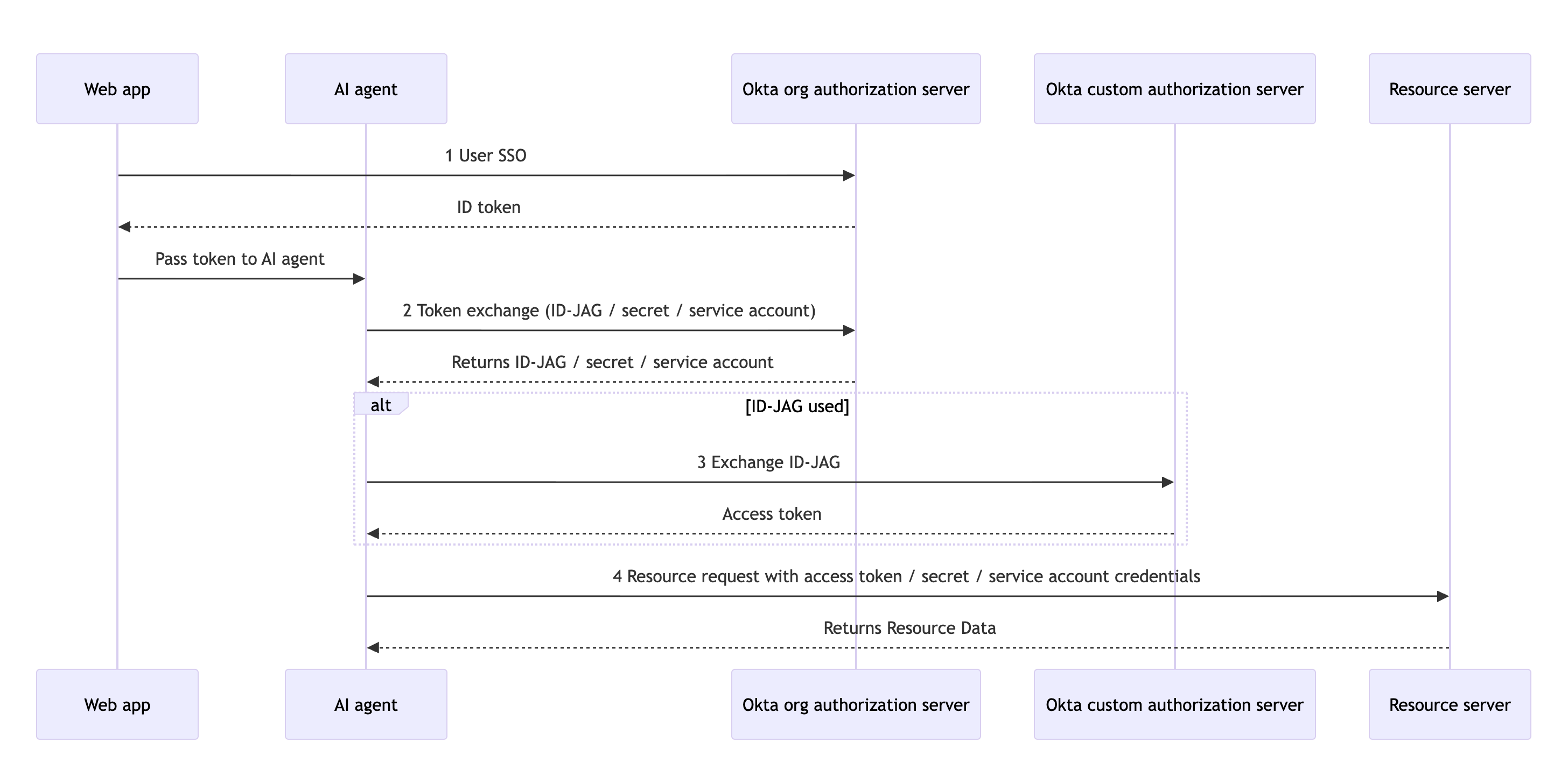
Note: This flow assumes that user authentication and authorization are complete and the authorization server issued an access token and ID token associated with a successful login to the linked OIDC app.
The token exchange flow for an AI agent involves the following steps:
- The user authenticates with the Okta org authorization server using a web app. The server returns an ID token to the web app.
- The web app passes the ID token to the AI agent so that it can perform actions on the user's behalf.
- The AI agent sends the ID token to the org authorization server and requests an exchange for the resource token/credentials (ID-JAG, secret, or service account). The server validates the request based on the configuration in the Managed Connections tab and returns the requested ID-JAG, secret, or service account.
- If the requested credential was an ID-JAG, the AI agent sends the ID-JAG to the custom authorization server to exchange it for a usable access token.
- The AI agent uses the access token, secret, or service account credentials to request access to the resource.
Flow specifics
Note: The instructions on this page are for the
resource type. If you want to change the resource type on this page, select the resource type you want from the Instructions for dropdown list on the right.
Authorization Code with PKCE request
To initiate the token exchange flow, the client must first obtain an ID token from the org authorization server.
Note: You must use the org authorization server and not the custom authorization server for this step.
Use the Authorization Code with PKCE flow to obtain an authorization code for the client. See Implement authorization by grant type.
Exchange token ID for resource token
Note: The instructions on this page are for the
resource type. If you want to change the resource type on this page, select the resource type you want from the Instructions for dropdown list on the right.
Response
The response contains the requested resource token.
